
Aug 12th 2026
Resources
- Facebook Ads for Amazon [Video Course]
- Drive Traffic To Amazon [Ultimate Guide]
- Get More Amazon Reviews [Ultimate Guide]

TL;DR
Which Amazon savings tool should sellers choose?
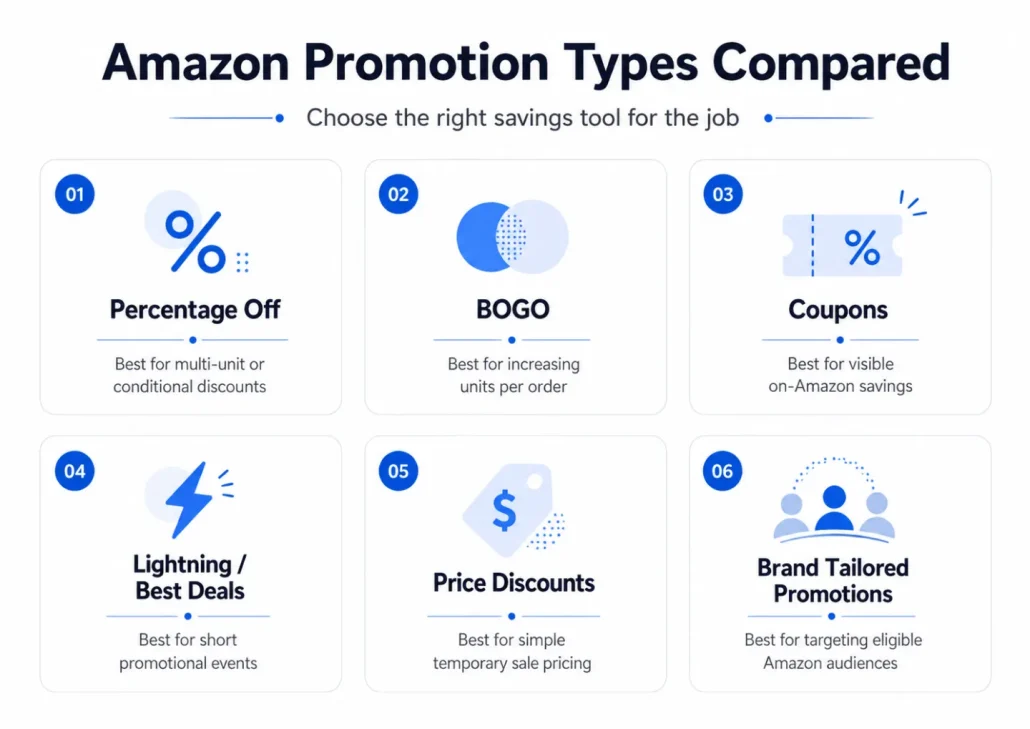
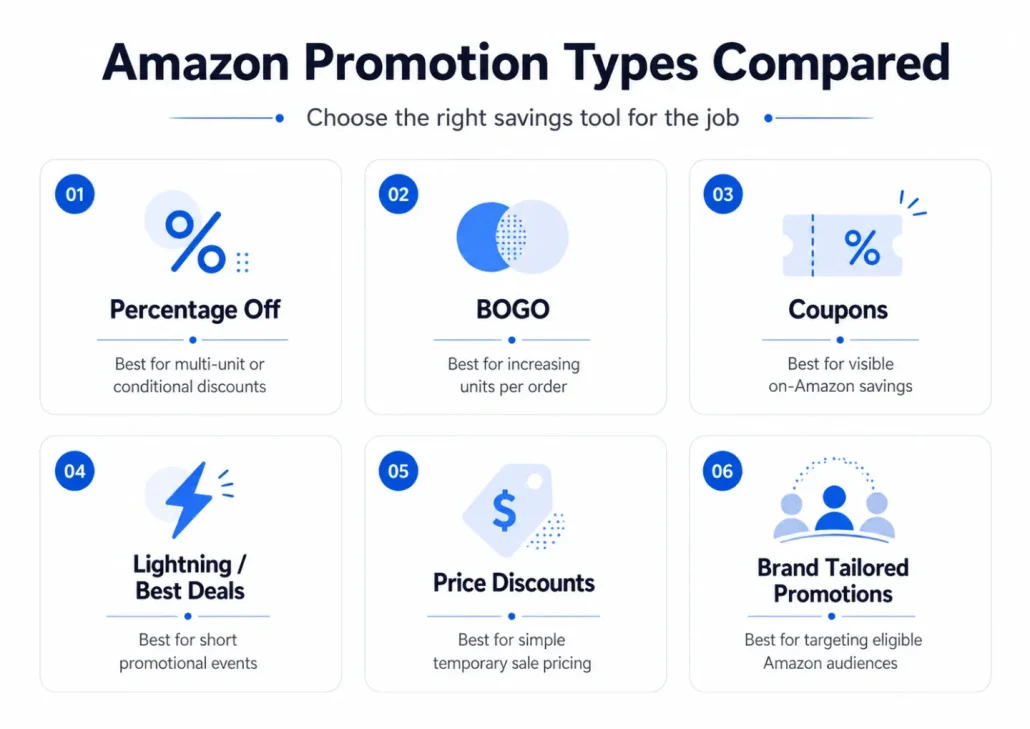
Start with the behavior you want to change. Percentage Off and BOGO work well for conditional or multi-unit offers, Coupons and Price Discounts suit broadly visible savings, while Brand Tailored Promotions can target eligible Amazon audiences.
What changed for Percentage Off promotions?
Since September 2025, Percentage Off promotions without a claim code require customers to buy at least two units. Sellers can still create eligible single-unit Percentage Off offers with a claim code or consider a Coupon instead.
How can sellers stop promotions from destroying their margin?
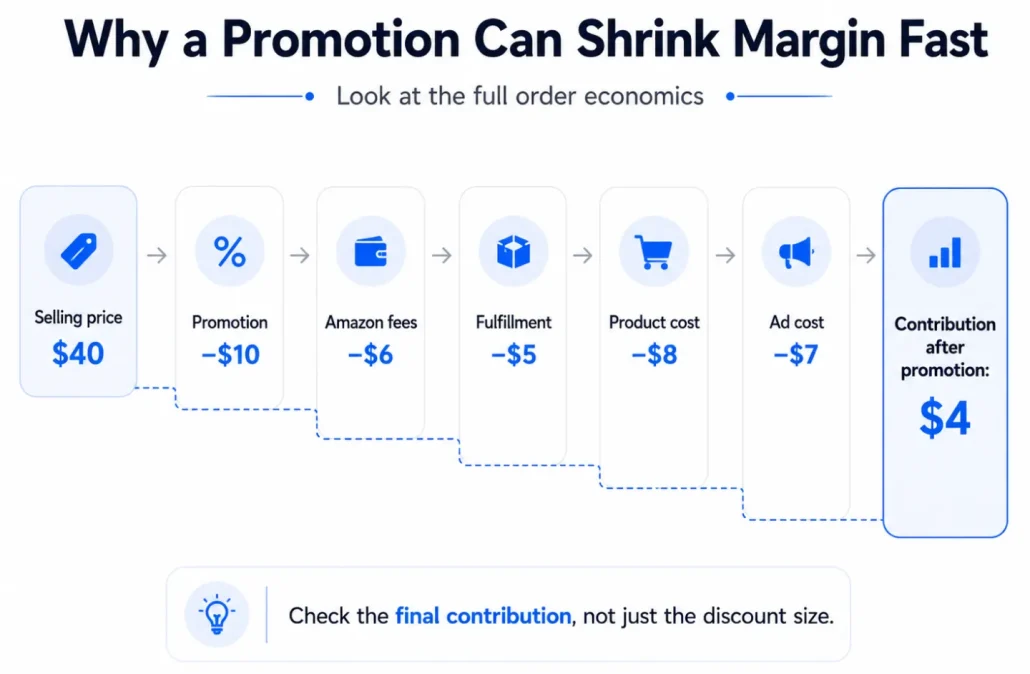
Review the final economics at the ASIN level, including customer savings, Amazon fees, fulfillment, product cost and external advertising. Also check for overlapping Coupons, Price Discounts and other promotions before launch.
How should off-Amazon promotion performance be measured?
Don’t judge a campaign only by clicks or promo-code redemptions. Eligible sellers can use Amazon Attribution to connect external traffic with Amazon-side actions such as detail-page views, add-to-carts, purchases and sales.
Amazon gives sellers several ways to put an offer in front of shoppers, but they are not interchangeable. A Percentage Off promotion, a BOGO offer, an Amazon Coupon, a Lightning Deal and a Price Discount may all reduce what a customer ultimately pays, yet they work differently inside Seller Central, appear differently to shoppers and create very different risks for your margins.
That distinction has become even more important as Amazon has continued to change its promotional tools. Sellers now need to think about claim codes, promotion budgets, discount stacking, minimum purchase quantities and whether an offer should be visible to everyone or reserved for a specific audience. A promotion that looks simple from the customer side can therefore require a surprising amount of planning behind the scenes. Amazon’s current seller guidance distinguishes Promotions from Coupons, Deals and Price Discounts rather than treating all four as the same thing.
The two core discount mechanics behind Amazon promotions are Percentage Off and Buy One Get One (BOGO). Amazon’s May 2026 public seller guide also lists Custom Social Media Promo Codes for distributing promotional offers through channels such as social media, email and influencer marketing. Amazon’s public documentation currently uses slightly different terminology across its resources for social-media promotions, so always check the options available in your US Seller Central account before launching a campaign.
Table of Contents
- Amazon Promotions vs Coupons vs Deals vs Price Discounts
- What Amazon Sellers Need to Know About Promotions in 2026
- The Benefits of Amazon Seller Central Promotions
- Choosing the Right Amazon Promotion for Your Goal
- How to Create a Promotion on Amazon (to Advertise Outside Amazon)
- How to Promote Your Promotion
- Other On-Amazon Savings Options
- Amazon Coupons vs Promotions: What’s the Difference?
- How to Prevent Amazon Promotions From Destroying Your Margin
- Amazon Seller Promotion Best Practices
- How to Measure Whether an Amazon Promotion Actually Worked
- Amazon Seller Promotions: In Summary
- FAQ: All About Amazon Seller Promotions
This guide explains what each option actually does, how to set up Amazon seller promotions, how claim codes work, how promotion budgets are calculated, and how to stop overlapping discounts from wiping out your contribution margin. We’ll also look at when Coupons, Deals or Price Discounts make more sense than a traditional Seller Central promotion.
Amazon Promotions vs Coupons vs Deals vs Price Discounts
Amazon uses several terms that sound almost interchangeable. They aren’t.
In everyday ecommerce language, a seller might call virtually any temporary offer a “promotion.” Inside Amazon’s ecosystem, however, Promotions are a particular family of Seller Central tools. Coupons, Deals and Price Discounts have their own setup workflows, eligibility requirements, visibility and economics. Amazon itself now presents these as four separate ways sellers can offer savings.
Understanding that distinction should come before you start clicking around Seller Central, because the best tool depends on what you actually want the shopper to do.
| Option | What it does | Best suited to |
|---|---|---|
| Percentage Off Promotion | Reduces the price by a percentage when promotion conditions are met | Multi-unit purchases, targeted codes, external campaigns |
| BOGO Promotion | Gives one or more free units after a qualifying purchase | Increasing units per order, bundles, inventory movement |
| Amazon Coupon | Gives a percentage or dollar discount that customers can discover and clip | Broad on-Amazon visibility and straightforward single-item offers |
| Lightning / Best Deal | Runs a time-limited offer with deal merchandising | Short bursts of visibility and event-led promotions |
| Price Discount | Shows a temporary reduced price, potentially with a validated reference-price treatment | Straightforward sale pricing, including eligible Prime-specific campaigns |
Amazon’s current guidance describes Percentage Off and BOGO as the core seller promotions. Coupons may appear across product detail pages, search results and deal discovery surfaces. Deals currently include Lightning Deals and Best Deals. Price Discounts can run for a limited period and can be configured for all customers or, where eligible, Prime customers.
That means there is no universally “best” Amazon promotion.
If your objective is to get a shopper to purchase three units rather than one, Percentage Off or BOGO is often the more natural mechanism. If you simply want somebody who is already browsing Amazon to notice that a single unit is cheaper today, a Coupon or Price Discount may communicate that offer more directly.
There is also an important visibility distinction. A claim-code promotion can be useful when you want to control who receives an offer—for example, subscribers on your email list or visitors from an external campaign. A broadly visible Coupon is designed for a different job: helping an Amazon shopper discover and redeem an offer without first receiving a private code.
Before creating anything, start with the behavior you want to change. Then choose the promotional mechanism. Too many sellers do the reverse: they see a feature inside Seller Central, turn it on, and only afterwards work out what they wanted it to accomplish.
What Amazon Sellers Need to Know About Promotions in 2026
If you last created an Amazon promotion a few years ago, don’t assume the old process still applies. Amazon’s promotional ecosystem has changed enough that many older tutorials now contain settings, terminology and restrictions that sellers will no longer see exactly as described.
One especially important change took effect on September 2, 2025. A Percentage Off promotion without a claim code now requires the buyer to purchase at least two units. Sellers who want to discount a single unit can still use a Percentage Off promotion with a claim code. Professional sellers can also consider an Amazon Coupon when they want to offer a single-unit discount without requiring a claim code, although Coupon costs can apply.
Promotion budgets are another important part of the modern workflow. When you create a Percentage Off or BOGO promotion, Amazon requires you to specify a budget using either a monetary amount or an order count. That budget is not the same thing as an advertising budget: it represents the customer savings you are willing to fund through the promotion.
Amazon also now presents its broader savings tools more distinctly. Current seller documentation separates Promotions from Coupons, Deals and Price Discounts, and current Deals terminology centers on Lightning Deals and Best Deals.
Amazon’s current documentation uses slightly different terminology for social promotions. Its detailed promo-code guidance treats Percentage Off and BOGO as the two underlying promotion mechanics, while Amazon’s newer 2026 Promotions overview also lists Custom Social Media Promo Code as a separate option. The exact labels available in Seller Central can therefore depend on the workflow you’re using.
The Benefits of Amazon Seller Central Promotions
A common objection to running a promotion is “I can’t afford it”. A lot of sellers don’t want to offer a discount because they don’t have any room in their profit margins.
While this may be true, Amazon promotions offer a lot of long-term benefits. It’s a mistake to view the profit from each individual sale as the only thing that matters.
Some of the top reasons to run Amazon seller promotions include:
Increasing sales velocity
RANK LIKE THE PROS
Discover a better way to rank products from external traffic, like Facebook, Google and TikTok, with LandingCube promo pages.
Try it free for 21 days.
Increasing sales velocity can be valuable when the additional volume produces healthy contribution margins or helps improve inventory turnover.
Moving inventory efficiently can contribute to a healthier IPI score by improving sell-through and reducing excess or aged inventory. IPI is based on several inventory-health factors, however, and higher sales alone do not guarantee a higher score.
For many sellers, improving inventory turnover can be more valuable than protecting the highest possible margin on every unit, particularly when slow-moving stock is tying up capital or accumulating storage costs
Higher average order value
Promotions can increase units per order and, depending on the structure of the offer, average order value. A multi-unit Percentage Off promotion can encourage customers to purchase more products in exchange for a larger discount, while BOGO can increase the number of units in each transaction.
A higher AOV can increase revenue per transaction and improve the economics of customer acquisition, provided the incremental discounts, fulfillment costs and product costs do not consume the additional margin.
Promotions Can Create Sales Momentum, but Ranking Gains Aren’t Guaranteed
One reason sellers run promotions is to generate more sales over a concentrated period. That additional volume can have secondary benefits: more customers discover the product, inventory moves faster and external campaigns can create additional activity around the listing.
However, don’t build the financial case for a promotion around the assumption that discounted sales will automatically push the product to a particular organic position.
Amazon does not publish a simple equation that says a given number of promotional orders produces a predetermined ranking increase. Search visibility is affected by a much broader set of product, relevance and performance signals.
Treat any subsequent organic lift as an upside rather than the only reason the campaign can afford to lose money. A good promotion should make strategic sense even before you assign a hypothetical future ranking benefit to it.
Promotions should also never be structured to manipulate Amazon search rankings. For example: by incentivizing shoppers to perform specific searches intended to appear as organic behavior.
Learn more about Amazon search ranking factors, and how to get more organic sales for your products.
Incentivizing opt-ins
Any sellers who have a large and engaged email list know how powerful this can be. However, convincing people to join your email list can be hard.
Promotions can also help turn off-Amazon traffic into a first-party audience. For example, sellers can use a landing page to offer an eligible promotional code while collecting email opt-ins, giving them a way to build an audience they can reach again in future campaigns.

Choosing the Right Amazon Promotion for Your Goal
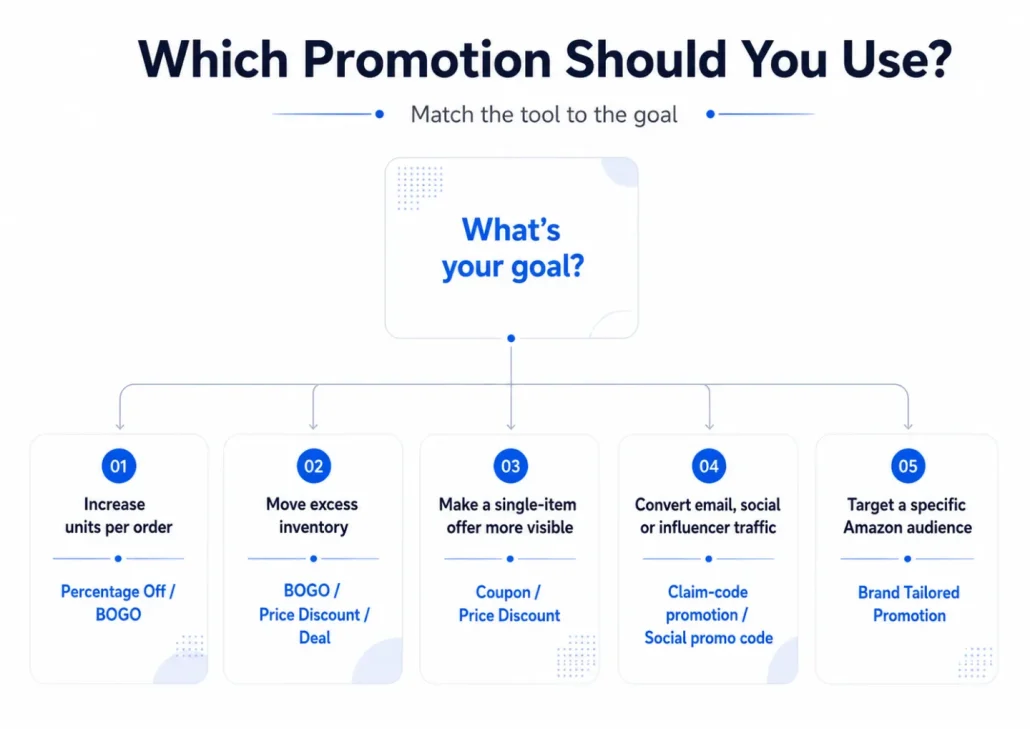
The promotion with the biggest headline discount isn’t automatically the strongest promotion. Start by asking what you want an incremental customer to do differently.
For a product launch, the objective may simply be to remove enough friction for shoppers to try an unfamiliar ASIN. If you’re clearing slow inventory, the objective is different: moving units and freeing capital may matter more than preserving your normal per-unit margin. If you’re already selling steadily but want customers to buy more at a time, a tiered Percentage Off promotion or BOGO offer can change basket composition without discounting every one-unit order.
Consider a $30 replenishable product. Offering everybody 20% off a single unit cuts $6 from every qualifying order. But if your actual objective is to increase units per order, “buy three and save 20%” asks the customer to change behavior in exchange for that discount. The promotion is paying for a larger basket rather than simply subsidizing the purchase that might have happened anyway.
BOGO can be particularly useful when the perceived value of the free item is considerably higher than its marginal cost to you. If the product has a $25 retail price but comparatively low landed product cost, “buy two, get one free” may feel more valuable to the shopper than a modest percentage discount while producing different unit economics for the seller.
External campaigns require another decision. If somebody is discovering your product through Google, Meta, TikTok, an influencer or your email list, a controlled claim code can give that traffic a reason to act now. But the promotion should be treated as part of the customer-acquisition cost, not as free incremental sales.
The most useful question isn’t “What discount percentage converts best?”
It is:
What customer behavior am I willing to pay to create, and what is the maximum amount I can afford to pay for it?
That framing will produce better promotion decisions than choosing a discount simply because 20%, 30% or 50% looks attractive.
RANK LIKE THE PROS
Discover a better way to rank products from external traffic, like Facebook, Google and TikTok, with LandingCube promo pages.
Try it free for 21 days.
How to Create a Promotion on Amazon (to Advertise Outside Amazon)
Amazon promotions are particularly useful when you are driving customers to your product from outside Amazon. If someone discovers your product through Facebook, Google, TikTok, an influencer, your email list or another external channel, a compelling promotion can give them an extra reason to click through and buy.
The first step is to log in to Seller Central and go to Advertising > Promotions. From here, you can create and manage promotions for the products in your catalog. When you create a promotion, you’ll need to define which products are eligible for the offer.

Product Selections
A Product Selection defines which products can participate in your promotion.
This is useful if you want the same promotion to apply across several products or variations. Instead of adding each individual product every time you create a new promotion, you can build a Product Selection containing the relevant SKUs or ASINs and then use that selection when configuring the promotion.

From the Promotions area, go to Manage Product Selection and choose Create Product Selection. You can then add the products that should be eligible for the offer.
Take a moment to check this carefully before moving on. If you sell several sizes, colors, bundles or variations, make sure you are only including the products you actually intend to discount. Accidentally adding a bestselling SKU to a promotion designed to clear a slow-moving variation can become expensive very quickly.
It’s also worth using a clear internal description and tracking ID. Once you have several promotions running throughout the year, names such as “SUMMER26-20OFF” are much easier to understand than “Promotion 3.”
Once your Product Selection is ready, you can create the promotion itself.
Percentage Off
Percentage Off promotions are one of the most flexible options available to Amazon sellers. Rather than simply lowering the price of your product for everyone, you can define the conditions customers must meet before receiving the discount.
1. Start by selecting Percentage Off in the Promotions area.
The first thing to decide is what the customer needs to purchase. You can define the qualifying purchase conditions for the promotion, such as requiring customers to purchase a specified quantity of eligible products.
This allows you to use the promotion to encourage a specific type of behavior.
2. Next, choose the percentage discount and the products to which the benefit applies.
This is also where you should stop and check the economics of the promotion. The right discount is therefore not necessarily the biggest discount you can afford. It is the smallest discount that produces enough additional sales or order value to justify what you are giving away.
After defining the offer, configure the schedule, internal tracking information and promotional budget. You will also need to decide whether the promotion requires a claim code. This is particularly important when you are advertising outside Amazon because it gives you more control over who can access the discount.
A single-use code can only be redeemed once, making it useful when you want tight control over distribution. A group code can be shared with multiple customers, which makes it easier to advertise through email, social media or influencers.
Group codes can spread beyond the audience you originally intended. A code emailed to 500 customers can easily end up on a deal site or be shared on social media. The deeper your discount, the more carefully you should think about how widely the code can be distributed.
Finally, review all the promotion settings before submitting the campaign. Check the qualifying products, discount percentage, schedule, budget and claim-code settings, and make sure there are no other active offers that could unexpectedly combine with the promotion.
Learn more about running discount code promotions, and the benefits of single use vs group codes, here.
Buy One Get One
This promotion gives customers a free product (or products) when they make a qualifying purchase. Buy One Get One, or BOGO, promotions work differently from a straightforward Percentage Off offer because the customer’s reward is one or more free products.
Despite the name, you are not limited to a traditional “buy one, get one free” structure. You can create variations such as buy two, get one free or buy three, get one free, depending on the offer you want to run.
Start by selecting Buy One Get One from the Promotions area.
Under the promotion conditions, define what the customer needs to purchase before receiving the free item. This might be a specific quantity of products or a minimum purchase amount.
Then select the Product Selection containing the qualifying products.
The next important setting determines how many free units the buyer receives in relation to the qualifying purchase. This is where you need to pay close attention to the numbers you enter.
If your offer is “buy two, get one free,” the promotion needs to reflect exactly that relationship. Don’t assume Amazon will interpret your intention from the promotion name.
Before publishing the offer, work through a few hypothetical baskets yourself.
What happens if somebody buys two units? What happens if they buy four? Can the free-product benefit be triggered more than once? What happens if several products from your Product Selection qualify?
Thinking through these scenarios before launch can prevent you from accidentally giving away far more inventory than you planned.
BOGO promotions can be particularly attractive for products with relatively low unit costs. A free product may have a perceived retail value of $25 to the customer while costing the seller considerably less to produce.
That does not mean the extra unit is actually free to you. Product cost, fulfillment fees and other variable costs still apply, so calculate the economics before deciding how generous the offer should be.
Once the conditions are set, configure the schedule, promotional budget and any applicable claim-code settings. As with Percentage Off promotions, check whether other discounts are already attached to the participating ASINs before the BOGO campaign goes live.
Custom Social Media Promo Codes
The Social Media Promo Code is a Money Off promotion, that works like a multi-use Group Promo code. If the main purpose of your promotion is to reach customers outside Amazon, a Custom Social Media Promo Code can make the offer easier to distribute.
Amazon’s May 2026 seller guide lists Custom Social Media Promo Codes as one of the promotion options available through Advertising > Promotions in Seller Central. Despite the name, you are not limited to posting the offer on social media. Amazon specifically positions these promo codes for distribution through social channels, email and influencer marketing.
That makes them useful when the promotion itself is part of your external marketing message. Instead of simply sending someone to a product page and hoping they convert, you can give the campaign a clear reason to act now:
Save 20% on Amazon with code SUMMER20.
This can work particularly well for product launches, email campaigns, influencer partnerships or paid social campaigns where the offer needs to be easy to understand before the shopper reaches Amazon.
As with any promotion distributed outside Amazon, however, think about how widely you want the offer to spread. A code published in a social post or influencer video can reach people far beyond your original audience. If the discount is deep or inventory is limited, make sure your inventory, margins and any applicable budget controls can support more redemptions than your initial traffic forecast suggests.
Separately, when you create claim codes for Percentage Off or BOGO promotions, Amazon supports two claim-code types: single-use and group codes. Single-use codes are unique and can only be redeemed once, while a group code can be used by anyone who has it, although you can restrict a group code to one use per customer. Amazon requires a group claim code if you want to share a qualifying promotion with Amazon Influencers or Associates or display the promotion on the product detail page.
That means the right approach depends on the campaign. A public influencer promotion needs different redemption controls from a private offer sent to a small group of customers.
Review Your Promotion Before You Launch It
Before sending traffic to your promotion, take a few minutes to test the offer exactly as a customer would experience it.
Confirm that the correct products are included, the qualifying purchase is set properly, the discount or free-item benefit matches what you intend to advertise, and the start and end dates are correct. If the promotion uses a claim code, verify that the code works and that the redemption settings match your campaign.
Also check the participating ASINs for other active Coupons, Promotions or Price Discounts that could affect the final checkout price. Your goal here is not to model every financial scenario again, but simply to make sure the promotion behaves the way you expect before customers start using it.
If you are planning an email blast, influencer campaign or paid advertising push, confirm that the promotion is active and review the customer-facing offer before launching your external campaign. Do not place an order for your own product to test the promotion.
Once the offer is working correctly from the shopper’s perspective, you are ready to start driving traffic to it.
How to Promote Your Promotion
If your promotion is not displayed directly to shoppers on Amazon, you’ll need to distribute the offer yourself through an external channel.
There are a few ways you might do this, including:
- Meta Ads
- Google Ads
- TikTok and other paid social channels
- Organic posts on social media
- Influencer/affiliate marketing
- Messenger or other messaging automations
For more on your external traffic strategy, check out this guide.
Whichever channel you choose, you should put your promotion front and center. This is a great opportunity to encourage people to click through from your ads, your emails, or whatever it is. So make sure it’s clear.
Other On-Amazon Savings Options
Beyond the core Seller Promotions workflow, Amazon offers several other savings tools aimed primarily at shoppers already browsing the Amazon store. The main options include Coupons, Lightning and Best Deals, Price Discounts and, for eligible brands, Brand Tailored Promotions. Each works differently from Percentage Off, BOGO and claim-code promotions.
Coupons can increase the visibility of a savings offer across Amazon and may give shoppers an additional reason to convert.
Lightning Deals typically run for 4–12 hours, while Best Deals can run for 1–14 days. They can provide additional visibility for eligible products during a limited promotional window, although eligibility requirements and costs may apply.
Price Discounts
Price Discounts are another option when you want shoppers on Amazon to see a temporary lower price without requiring them to enter a promo code.
Unlike a Percentage Off or BOGO promotion, a Price Discount is primarily about changing the price presented to eligible shoppers for a defined period. Amazon describes Price Discounts as time-bound campaigns that can run for up to 30 days on a limited number of units. Sellers can choose the dates, discount type and eligible audience when setting up the campaign.
Where the product has an eligible validated reference price, the discounted offer can also appear with a strike-through price, making the savings immediately visible to the shopper.
That makes Price Discounts useful for a different job from claim-code promotions.
Suppose a product normally sells for $49.99 and you want eligible shoppers to see that it is temporarily available for $39.99. A Price Discount communicates that change directly. The customer does not first need to receive a code through an email, influencer or external advertisement.
A claim-code promotion is often a better fit when access to the offer itself is part of the campaign—for example, when you want to reward a particular off-Amazon audience or encourage customers to buy multiple units.
Price Discounts can also be configured for specific audiences where eligible. Amazon currently allows sellers to create exclusive price discounts for Prime members in appropriate campaigns.
As with every other savings mechanism in this guide, check for overlapping offers before the Price Discount begins. If the same ASIN also has a Coupon or another promotion running, calculate the final customer price rather than evaluating each discount in isolation.
Depending on the campaign, Amazon says there may also be a cost to run a Price Discount; any applicable amount is shown during the creation process in Seller Central.
Brand Tailored Promotions
For brands enrolled in Amazon Brand Registry, Brand Tailored Promotions provide another way to offer discounts without making the same promotion available to every Amazon shopper.
Instead, the tool allows eligible brands to create offers for particular Amazon-defined audiences based on how those shoppers have interacted with the brand.
For example, a brand might want to encourage a prospective customer who has shown interest but never purchased, bring back a lapsed customer, reward repeat buyers or encourage a shopper who abandoned their cart to complete the purchase.
Amazon currently allows eligible Brand Representatives to offer 10% to 50% discounts through Brand Tailored Promotions. Offers can apply across the brand’s catalog or to selected ASINs, and each eligible customer can redeem the promotion on a single purchase.
The important difference is targeting.
A standard Amazon Coupon may be useful when you want the offer to be broadly visible to shoppers. A public social-media promo code can be distributed to anyone who sees your external campaign. Brand Tailored Promotions, by contrast, allow you to use Amazon’s own audience signals to determine who is eligible to receive the offer.
Current targeting options are organized around goals such as new customer acquisition, customer retention, re-engagement and cross-selling. Amazon can identify audiences including shoppers who have clicked on or added your products to their carts without purchasing, repeat customers, high-spending customers and customers whose engagement with the brand has declined.
Not every seller can use the feature. Amazon currently requires the brand to be enrolled in Amazon Brand Registry, and the primary account must be designated as the Brand Representative. Product and audience eligibility requirements also apply.
One detail is especially important when planning the economics: Brand Tailored Promotions can stack with some other customer savings, including Coupons. Amazon therefore specifically advises sellers to review other active offers to avoid discounting products more deeply than intended.
For example, offering 15% off to high-intent shoppers who viewed or added a product to their cart but never purchased may be more efficient than giving every visitor 15% off. Likewise, a targeted promotion for repeat customers can support retention without automatically reducing the price paid by new customers who were already willing to buy at full price.
Amazon also requires a qualifying audience of at least 1,000 shoppers before you can create a Brand Tailored Promotion for that audience.
Amazon Coupons vs Promotions: What’s the Difference?
Amazon Coupons and Seller Central Promotions both save customers money, but the way customers encounter the offer is different.


Coupons are designed to be discoverable. Amazon says they may appear on product detail pages, in search results, on the Amazon Deals page and alongside products customers have already added to their carts. The shopper can clip the Coupon and receive the corresponding percentage or dollar discount. Eligibility requirements and costs can apply.
Seller Promotions give you more control over conditional behavior. You can build Percentage Off or BOGO offers around quantities, qualifying purchases and claim codes.
That makes Coupons particularly useful when your objective is to improve the attractiveness of an offer to shoppers who are already browsing Amazon. A claim-code promotion is often a stronger fit when the offer is meant for an audience you’re directing to Amazon yourself.
There is one especially important reason to understand both systems: they can interact with other discounts.
How to Prevent Amazon Promotions From Destroying Your Margin
Most promotion disasters don’t happen because the seller forgot how percentages work. They happen because several individually reasonable settings interact.
You might have a 15% Coupon running to improve conversion on Amazon. Marketing launches a 25% claim-code campaign for an email audience. Another team member has scheduled a Price Discount for an upcoming event. Each decision may make sense in isolation.
Together, they can create a completely different effective price. Amazon specifically advises sellers to check for unintended discount stacking when using multiple forms of customer savings.
The financial review therefore needs to happen at the ASIN level, not merely the campaign level.
Start with the normal selling price and work down:
Selling price
– promotion/customer savings
– Amazon selling fees
– fulfillment or shipping cost
– landed product cost
– external advertising cost
– other variable costs
= contribution after promotion
If the answer is negative, you’re paying for every incremental order.
That can occasionally be an intentional decision. You might accept a controlled loss to liquidate obsolete inventory or acquire customers in a situation where you have a defensible lifetime-value model.
But the loss should be deliberate.
“Maybe the increase in sales will improve organic ranking later” is not a sufficient margin model.
How Amazon Promotion Budgets Work
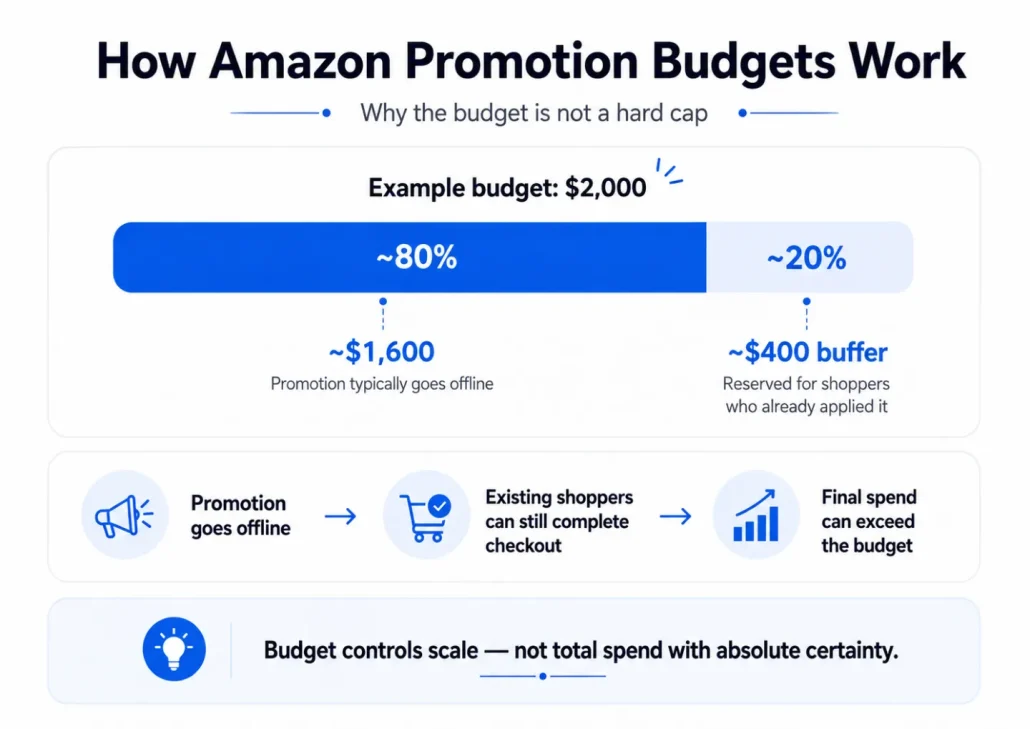
Amazon requires you to set a budget when creating a Percentage Off or BOGO promotion. You can define that budget either as a currency amount or as a number of orders. As qualifying purchases are made, the savings customers receive are deducted from the promotion budget.
The important point is that this budget should not be treated as a guaranteed hard spending cap.
Amazon generally takes the promotion offline once redemptions reach around 80% of the budget you entered. The remaining portion is effectively left as a buffer for customers who have already applied the promotion but have not completed their purchase yet. Amazon says these customers may still have roughly 30 minutes to finish their transaction after the promotion goes offline.
That means the eventual cost of the promotion can exceed the amount you might expect from looking only at the point when Amazon stops showing the offer.
For example, imagine a promotion where each qualifying order gives the customer $25 in savings. If you set a $2,000 promotional budget, Amazon would generally take the promotion offline once approximately $1,600 of the budget had been redeemed. Customers who had already applied the offer could still complete their purchases during the remaining redemption window.
The budget is therefore a useful way to control the scale of a promotion, but it does not replace your own financial planning.
Before launch, work out how many redemptions you can realistically afford, how much inventory those redemptions could consume and what happens to your contribution margin after the discount. If the business cannot comfortably absorb slightly more promotional spend than the nominal budget, the budget is probably set too high.
The same principle applies to inventory exposure. Calculate your maximum plausible redemption volume before launch. If a promotion escaped its intended audience tomorrow, how many units could be sold at the promotional price before you noticed?
If the answer makes you uncomfortable, reduce the budget, restrict quantities, use more controlled claim codes or redesign the offer.
Amazon Seller Promotion Best Practices
Here’s some advice to help you get the most value out of your Amazon seller promotions, and mitigate any potential loss or damage caused by the promotion.
Use single-use codes for high discounts
If you’re not comfortable selling all your remaining stock at the discounted price, make sure you make discount codes single-use.
Set a max order quantity during big promotions
A single-use claim code controls whether that specific code can be redeemed again, but you should still review the quantity exposure created by the promotion itself. For promotions where a large order could create unacceptable losses or inventory risk, consider setting an appropriate Maximum Order Quantity for the ASIN and test the promotion with different basket sizes before launch.
Use your promotion to build your list
Discount codes are an awesome way to capture emails. If you’re sending people from Google, Facebook, YouTube etc, you should take this opportunity to build your list.
Instead of giving a discount code and a link straight to Amazon, link people to a landing page, where you offer the discount when they opt in with their email address.
This is a really powerful list building tactic. Once you have a list, you can use it to launch new products, up-sell or cross-sell other things you sell, or drive traffic for future promotions.
Keep Promotions Completely Separate From Review Incentives
Promotions can be used to encourage purchases. They must not be used to buy reviews.
Do not offer a discount, free product, reimbursement or other compensation in exchange for a customer writing a review. Amazon’s review policies prohibit incentivized reviews and other attempts to manipulate customer-review behavior.
The cleanest operating rule is to separate the two activities entirely.
Create promotions because you want to change purchasing behavior. Use Amazon’s permitted review-request mechanisms for review solicitation. Never make receipt of a discount conditional on leaving a review, changing a review or providing a positive rating.
There is no useful reason to invent a supposedly “safe” discount percentage for review activity. The relevant issue is whether compensation and review behavior are being connected.
What’s the best discount % to give?
There isn’t a universal Amazon discount percentage that produces the best result.
The correct number depends on your margin, price point, competitive environment, objective, audience and the incremental behavior created by the offer.
A seller clearing aging inventory has a different acceptable discount from a seller whose bestselling product would probably have converted at full price anyway. A launch campaign aimed at acquiring new customers has different economics from a BOGO campaign designed to raise units per transaction.
Start with your maximum economically acceptable discount, not the maximum number a shopper might find exciting.
For example, suppose a $40 product contributes $12 toward overhead and profit before any promotional discount or incremental advertising. A $5 discount leaves considerable room. A $10 discount consumes most of the contribution. A $16 discount puts you underwater before you even consider the cost of acquiring the customer.
That makes “40% off” neither good nor bad in isolation. It is simply a $16 customer-acquisition or inventory-movement expense.
Then test downward from the customer’s perspective. If 15% produces almost the same lift as 25%, the extra ten points are unnecessary leakage. If the promotion only begins materially changing behavior at 20%, that becomes a useful data point for the next campaign.
The objective is not to find the biggest discount you can afford. It is to find the smallest incentive that produces enough incremental value to justify its cost.
Keep in mind, big discounts are not always best.
LandingCube analysis found that coupon-page claim rates peaked around a 70% discount in its sample. However, this measured landing-page coupon claims rather than completed Amazon purchases, and sellers should not use it as a universal discount benchmark.
How to Measure Whether an Amazon Promotion Actually Worked
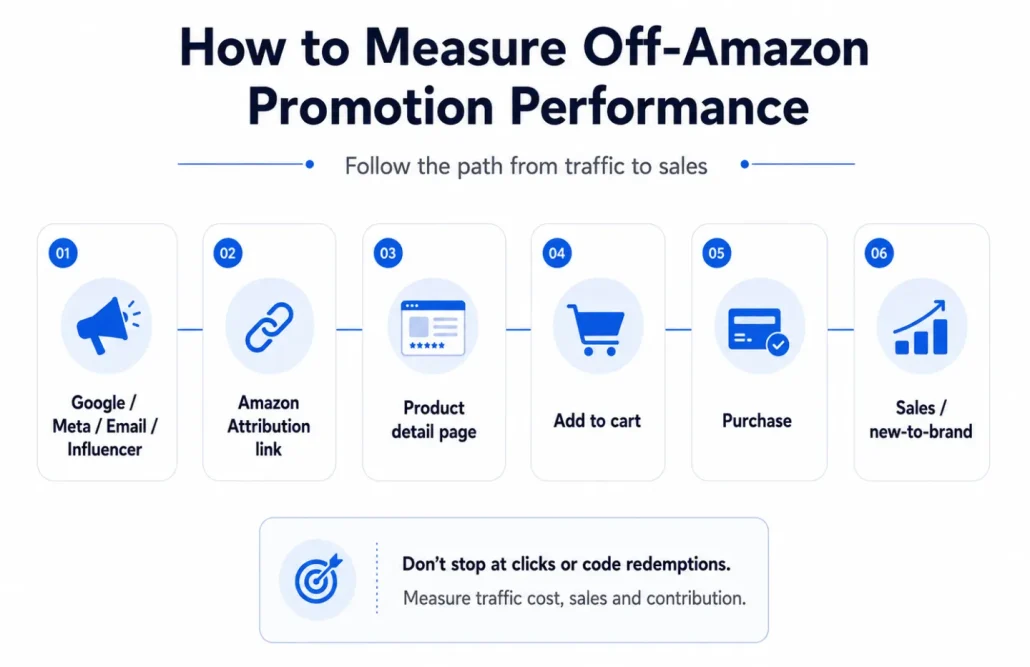
A spike in orders during a promotion doesn’t automatically make the campaign successful.
Start by deciding what success means before launch. If the campaign is intended to increase units per order, measure whether basket size actually changed. If you’re clearing inventory, measure sell-through and the amount of working capital released. If you’re acquiring customers through external traffic, measure the full acquisition economics rather than celebrating redemption volume.
At minimum, keep a campaign-level record of normal selling price, promotional price or customer savings, promotional orders, units, sales revenue, promotional rebates, estimated contribution margin and any paid-media cost associated with the campaign.
Amazon’s Promotions tool can help you track active promotion information and orders, while promotional rebate information can also appear in seller payment reporting.
External traffic deserves another layer of measurement.
Use Amazon Attribution for off-Amazon campaigns
If you’re eligible for Amazon Attribution and are driving traffic from Google Ads, Meta, email, influencers or other non-Amazon channels, use Amazon Attribution rather than relying only on clicks from the external platform.
Amazon Attribution can report Amazon-side activity including detail-page views, add-to-carts, purchases, sales and new-to-brand metrics for eligible campaigns.
That lets you answer much more useful questions.
- Did Campaign A generate more clicks but fewer Amazon purchases?
- Did one creative produce fewer visitors but substantially more add-to-carts?
- Did a promotion convert existing demand, or did it bring meaningful new customers into the brand?
Once you can see what happens after the outbound click, you can evaluate the promotion and traffic source as a single acquisition system.
Factor in Brand Referral Bonus when eligible
Eligible brands should also investigate Amazon’s Brand Referral Bonus when sending non-Amazon traffic. Amazon has described the program as providing a bonus averaging around 10% of qualifying sales, credited against future referral fees when qualifying external traffic is tracked with Amazon Attribution.
That can materially change the economics of an external promotion.
A campaign that appears marginal when you look only at advertising spend and discount cost can look different after accounting for eligible referral-fee credits. Conversely, an external promotion with impressive sales numbers can still be unattractive once discounts and acquisition costs are properly included.
The principle is the same in both cases: measure net economics, not redemption vanity metrics.
Amazon Seller Promotions: In Summary
Amazon promotions work best when the discount has a very specific job.
A Percentage Off promotion can encourage a shopper to buy more units. BOGO can increase basket size or help move inventory. Claim codes can give an external audience a reason to act. Coupons can make an offer more visible to shoppers already browsing Amazon, while Deals and Price Discounts serve different sale and merchandising objectives.
The difficult part is not creating the offer. Seller Central can walk you through the mechanics.
The difficult part is deciding how much customer behavior is worth paying for.
Before every promotion, know the qualifying products, expected redemption volume, promotion budget, worst-case inventory exposure and contribution margin after the discount. Check for overlapping Coupons, Price Discounts and other offers. Then measure what happens after launch rather than simply counting orders.
And if you’re using a promotion to convert external traffic, measure the entire journey. A landing page, controlled promo-code distribution and Amazon Attribution can help you understand which audiences and campaigns are producing actual Amazon sales rather than just clicks.
A promotion should accelerate a sound Amazon strategy. It shouldn’t be a substitute for one.
To make it easier to run successful promotions to audiences outside of Amazon, check out LandingCube. Our software tools (including landing pages and Messenger chat bots) help you automate sending unique promo codes, as well as capturing emails from your audience.
FAQ: All About Amazon Seller Promotions
An Amazon Seller Central promotion is a seller-funded offer created through the Promotions tool. Percentage Off and Buy One Get One (BOGO) are the two core promotion mechanics, while Amazon’s May 2026 seller guidance also lists Custom Social Media Promo Codes. Promotions are separate from Amazon Coupons, Lightning and Best Deals, and Price Discounts.
A promo code, also called a claim code, is used to redeem a Seller Central promotion such as an eligible Percentage Off or BOGO offer. An Amazon Coupon is a separate savings tool that customers can discover and “clip” on Amazon before receiving a percentage or dollar discount.
A single-use claim code is unique and can only be redeemed once. A group claim code uses the same code for multiple shoppers; Amazon allows sellers to restrict a group code to one redemption per customer.
Yes, if you create a group claim code. Anyone who has the group code can potentially use it, although you can configure it for one use per customer. Single-use claim codes are designed for individual redemptions and cannot be reused after redemption.
Yes. Amazon specifically supports distributing eligible promo codes through channels such as email and social media, and sellers can also share qualifying claim codes with Amazon Influencers and Associates. Publicly distributed group codes can spread beyond the audience you originally intended to reach, so factor that risk into your inventory and promotion planning.
Some promotions can be displayed on the product detail page. Amazon’s current promo-code guidance states that sellers who want to display an eligible claim-code promotion on the product detail page need to use a group claim code. Visibility can also depend on the promotion configuration and offer eligibility.
Amazon says there is no separate charge simply to create a promo code. However, you still fund the customer savings generated by the promotion, and Percentage Off and BOGO promotions require a promotion budget in Seller Central. Coupons, Deals and Price Discounts use separate cost structures and may have additional charges.
They can interact, so sellers should never assume that creating offers in different parts of Seller Central automatically prevents customers from receiving more than one saving. Amazon advises sellers to review overlapping Coupons, Promotions and Price Discounts carefully and calculate the customer’s potential final price before launch.
Amazon treats the promotion budget as a planning control rather than an absolute spending cap. In the US store, Amazon generally takes a promotion offline once redemptions reach around 80% of the budget, leaving the remainder for customers who have already applied the offer and may still complete a purchase during an approximately 30-minute window. This means final promotional spend can exceed the budget entered in Seller Central.
A promotion can generate additional sales activity, but Amazon does not publish a formula showing that a certain number of discounted orders will produce a specific organic ranking improvement. Sellers should therefore treat any subsequent organic lift as a potential secondary benefit rather than the financial justification for an otherwise unprofitable promotion.
You can use promotions to encourage purchases, but you cannot make a discount, free product, reimbursement or other compensation conditional on a customer leaving, changing or improving a review. Promotions and review solicitation should remain completely separate.
A single-use claim code controls reuse of that particular code; it should not be treated as a quantity limit for the underlying order. If unusually large orders would create unacceptable inventory or margin exposure, review the promotion setup and consider setting an appropriate Maximum Order Quantity for the ASIN.
RANK LIKE THE PROS
Discover a better way to rank products from external traffic, like Facebook, Google and TikTok, with LandingCube promo pages.
Try it free for 21 days.