
Jul 11th 2026
Resources
- Facebook Ads for Amazon [Video Course]
- Drive Traffic To Amazon [Ultimate Guide]
- Get More Amazon Reviews [Ultimate Guide]

TL;DR
How is AI impacting my new product’s conversion rate?
Amazon’s Rufus AI assistant actively summarizes customer sentiment directly at the top of your listing. Because of this integration, early negative feedback or a lack of reviews can deter shoppers before they even scroll down to read your copy.
Why does my daily budget disappear by 9:00 AM with zero sales?
You likely selected the aggressive “Dynamic Bids – Up and Down” strategy before establishing historical data. New campaigns must use the “Down Only” strategy to prevent Amazon’s algorithm from wildly guessing and doubling your bids on unproven, low-quality traffic.
How do I compete if my product costs more than the organic search results next to my ad?
You must drastically improve your visual merchandising to justify the premium price tag to the consumer. Alternatively, you should pivot to Sponsored Brands Video ads to demonstrate your item’s superior quality right in the search results, justifying the cost before the shopper even clicks.
Can unauthorized sellers actually hijack my paid ad traffic?
Yes, if an unauthorized reseller or hijacker undercuts your price by just one penny, Amazon will award them the Buy Box. In certain scenarios involving cached ad delivery or specific ad formats, your paid traffic might still land on the page, but the resulting sales are routed directly to the hijacker’s inventory instead of yours.
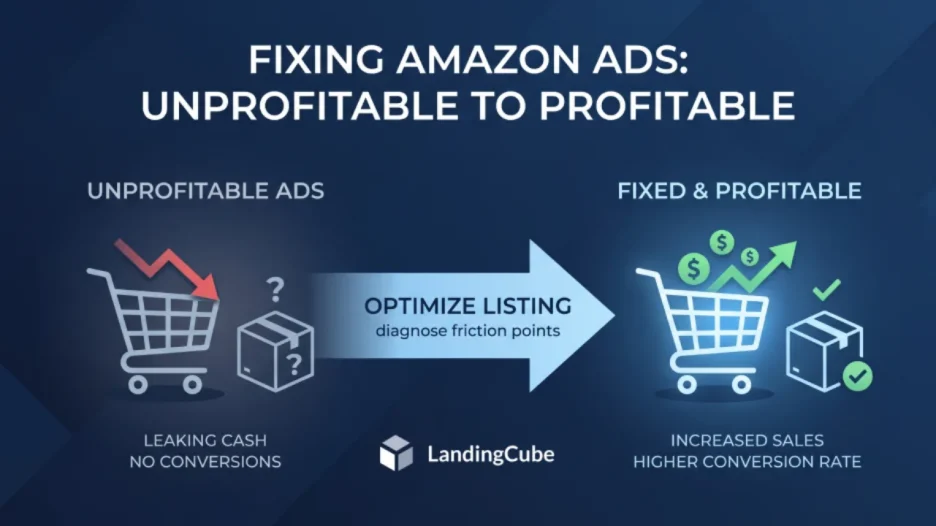
Logging into Amazon Seller Central and seeing high ad spend with no matching sales can be frustrating. For new US-based sellers, this result can make the campaign feel like a failure. You followed the tutorials, you set up your Sponsored Products campaigns, you allocated a daily budget, and the traffic is flowing. The impressions keep rising, the clicks keep coming in, and the ad costs continue to grow. Yet, your inventory sits completely stagnant in the fulfillment center.
When your Amazon ads do not convert, the instinct is to blame the advertising console. You might assume that Amazon PPC simply does not work for your specific niche, or that the algorithm is somehow broken. This is seldom the truth.
Table of Contents
- Reason 1: Your Product is Not “Retail Ready”
- Reason 2: Price Discrepancy on the Search Results Page
- Reason 3: Keyword Mismatch and Broad Match Bleed
- Reason 4: Poor Visual Merchandising and Listing Copy
- Reason 5: Utilizing the Wrong Bidding Strategy Too Early
- Reason 6: Losing the Buy Box to Hijackers or Price Suppression
- The Path to Profitability
- FAQ: All The Reason Why Amazon Ads Didn’t Convert
Amazon advertising does not force shoppers to buy. It gives your product more visibility. Pay-Per-Click (PPC) campaigns mainly buy visibility and traffic. Once the shopper lands on your product detail page, the listing has to do the selling. If the shopper leaves without buying, the issue may sit on the product listing rather than inside the ad campaign.
Think of your listing as the place where paid traffic either converts or drops off. If your listing has poor reviews, uncompetitive pricing, and confusing images, you will only spend more without fixing the conversion problem.
To improve profitability on Amazon, sellers need to stop treating PPC in isolation. You have to diagnose the friction points happening after the click. Here are the main reasons Amazon ads fail to convert and the steps sellers can take to fix them.
Reason 1: Your Product is Not “Retail Ready”
One common reason new sellers waste ad spend is that they launch campaigns before the listing is ready. They send paid traffic to a product that is not “retail ready.” On Amazon, social proof has a strong effect on buying decisions. Shoppers rely heavily on the experiences of others to validate their purchasing decisions, especially when evaluating a brand they have never heard of before.
If you run ads for a product with zero reviews or a low star rating, shoppers may hesitate. They may click your Sponsored Product ad, check the listing, and compare it with a competitor that has more reviews and a stronger rating. In many cases, they will choose the lower-risk option.
This issue is vastly compounded in 2026 by Amazon’s integration of Rufus, the AI shopping assistant. Rufus actively summarizes customer reviews and sentiment at the top of the listing. If your product has limited reviews or early negative feedback, AI-generated summaries may surface those concerns before shoppers read the rest of the listing.
How to Fix It: Consider reducing aggressive top-of-search campaigns until the product has enough social proof. Your priority is leveraging Amazon’s compliance-friendly review generation tools, specifically the Amazon Vine program, to secure your first fifteen to twenty reviews.
Do not spend heavily on broad discovery campaigns until your product maintains a minimum 4.2-star rating. If your rating drops below 4.0, your conversion rate can fall enough to make paid traffic harder to justify. You must fix the underlying manufacturing or quality assurance issue causing the negative sentiment, rebuild the rating, and only then turn the advertising hose back on.
Reason 2: Price Discrepancy on the Search Results Page
Your product appears beside competing products on the Amazon Search Engine Results Page (SERP). Shoppers can compare prices quickly, so your price needs to make sense beside similar listings.
Imagine you are selling a stainless steel garlic press for $35. You run a beautifully optimized ad that lands in the number one sponsored position. However, sitting directly next to your ad in the organic search results are four other stainless steel garlic presses, all boasting thousands of reviews, and all priced between $15 and $19.
A shopper might click your $35 ad simply because it is the first thing they see, which costs you a dollar. But within seconds, they will recognize the massive price discrepancy compared to the rest of the market. If your product costs much more than similar options, your main image needs to show why. This could include a valuable bundle, better materials, or a clear product feature. Without that visible reason, many shoppers will choose the cheaper option.
How to Fix It: Before you bid on a keyword, you must manually search that exact keyword on Amazon and analyze the neighborhood where your ad will live. You must understand the average price point of the products dominating page one.
If your product is priced significantly higher than the market average, you have two options. The first is to lower your price to achieve parity, at least temporarily, while you build sales velocity and ranking history. The second option is to drastically improve your visual merchandising to justify the premium price tag. If you choose the premium route, standard Sponsored Products ads might be inefficient. You should pivot your strategy toward Sponsored Brands Video ads, which allow you to demonstrate the superior quality of your expensive product in the search results, justifying the higher cost before the shopper even clicks.
Reason 3: Keyword Mismatch and Broad Match Bleed
A high Click-Through Rate (CTR) with a very low Conversion Rate (CVR) often points to keyword mismatch. This occurs when the search term driving the traffic does not align with the actual solution your product provides.
This problem almost exclusively plagues sellers who rely too heavily on Automatic campaigns or Broad Match manual targeting. When you use Broad Match, you surrender a significant amount of control to Amazon. If you bid broadly on the term “running shoes,” Amazon might display your ad to a shopper searching for “toddler running shoes.” If you sell men’s athletic footwear, the parent looking for toddler shoes might accidentally click your ad on their phone, realize it is adult sizing, and immediately leave.
Another variation of this is bidding on aspirational or overly generic terms. Bidding on “gifts for mom” might generate massive impressions and lots of clicks, but the intent is incredibly vague. The shopper doesn’t know what they want. Conversely, bidding on “lavender scented luxury bath bomb set” targets a shopper who knows exactly what they want and is ready to pull out their credit card.
How to Fix It: Match your targeting with the terms shoppers use when they are ready to buy. First, download your Amazon Search Terms report immediately. This report shows you the exact raw phrases shoppers typed into the search bar before clicking your ad.
Identify every search term that has consumed a statistically significant amount of budget (e.g., 15 clicks) without generating a single sale. You must take those specific, irrelevant phrases and add them to your campaign as Negative Exact keywords. This explicitly forbids Amazon from showing your ad for those bleeding terms ever again. Going forward, shift the vast majority of your advertising budget away from Broad match and funnel it into Exact Match campaigns, where you target highly specific, long-tail keywords that perfectly describe the physical reality of your product.
Reason 4: Poor Visual Merchandising and Listing Copy
RANK LIKE THE PROS
Discover a better way to rank products from external traffic, like Facebook, Google and TikTok, with LandingCube promo pages.
Try it free for 21 days.
When a shopper clicks your ad, the listing should answer their main questions quickly. If the images, bullets, and product details are unclear, the shopper may leave.
The main image of your product is responsible for getting the click, but your secondary images, bullet points, and A+ Content are responsible for securing the sale. A massive reason ads fail to convert is that the listing lacks the visual information necessary to answer the shopper’s subconscious objections.
If you are selling a piece of furniture and you fail to include an infographic detailing the exact dimensions, the shopper will leave because they do not know if it will fit in their living room. If you are selling a dietary supplement and you do not have a clear, zoomed-in image of the nutritional label, the shopper will bounce because they cannot verify the ingredients. In 2026, consumers do not read large blocks of text; they scan images. If your image carousel consists of five slightly different angles of your product on a plain white background, you are failing to merchandise effectively.
How to Fix It: You must overhaul your product detail page to act as a high-converting sales funnel. Utilize every single image slot available to you. Create infographic images that explicitly call out the top three benefits of your product. Create lifestyle images showing the product being used by your target demographic in a real-world setting. Include an image that clearly breaks down dimensions, sizing, or compatibility.
Furthermore, you must utilize A+ Content (Enhanced Brand Content) if you are brand registered. Replace the standard text description with rich modules, comparison charts, and brand storytelling. The longer you can keep a shopper visually engaged on your page, the higher the probability that the initial ad click will convert into a profitable sale. Tools like LandingCube can also assist you in building external landing pages to drive off-Amazon traffic, but before you do that, your core Amazon listing must be flawlessly merchandised.
Reason 5: Utilizing the Wrong Bidding Strategy Too Early
Amazon provides different algorithmic bidding strategies within the campaign setup, and selecting the wrong one will destroy your unit economics. Many new sellers mistakenly select “Dynamic Bids – Up and Down” when launching a new campaign, assuming they should let Amazon’s artificial intelligence aggressively pursue sales.
This can be risky for a new product. The “Up and Down” strategy authorizes Amazon to increase your maximum bid by up to 100% if the algorithm believes the shopper is highly likely to convert. However, because your campaign is brand new, Amazon has absolutely no historical data on your product. The algorithm does not actually know who is likely to buy your item yet. Consequently, the AI will wildly guess, frequently doubling your bids on low-quality traffic, burning through your daily budget by 9:00 AM, and leaving you with dozens of hyper-expensive clicks and zero sales.
How to Fix It: Every single new campaign you launch must be strictly set to the “Dynamic Bids – Down Only” strategy. This acts as a financial shield. It tells Amazon that you will never pay more than your stated maximum bid, but it allows the algorithm to actively lower your bid if the shopper looks like a window shopper.
You should only transition a campaign to the aggressive “Up and Down” multiplier after it has run for at least thirty to forty-five days, and you have mathematically proven that the specific keywords in that campaign convert at a highly profitable rate. You must earn the right to use aggressive multipliers by establishing a baseline of historical data.
Reason 6: Losing the Buy Box to Hijackers or Price Suppression
Sometimes, your ads are perfectly optimized, your listing is beautiful, and your product is heavily reviewed, but your conversions suddenly flatline to zero overnight. When this happens, the culprit is almost always a loss of the Buy Box.
The Buy Box is the prominent section on the right side of the Amazon product page that contains the “Add to Cart” and “Buy Now” buttons. To run Sponsored Products ads, you must currently be winning the Buy Box. If another seller, an unauthorized reseller or a malicious hijacker jumps onto your listing and undercuts your price by one penny, Amazon will award the Buy Box to them.
When this happens, your ads will typically pause automatically. However, there are scenarios (especially with certain Sponsored Brand formats or cached ad delivery) where traffic might still trickle to the page, but the sales are being routed directly to the hijacker’s inventory, not yours.
Alternatively, Amazon might suppress your Buy Box entirely if its automated bots detect that your exact product is being sold for a lower price on another platform, like Walmart or your own Shopify store. If the Buy Box is suppressed, the “Add to Cart” button is replaced by a clunky “See All Buying Options” button. This single UI change causes conversion rates to absolutely plummet, as shoppers assume the item is out of stock or unavailable.
How to Fix It: You must monitor your Buy Box win percentage daily within your Seller Central business reports. If you notice unauthorized sellers hijacking your listing, you must utilize the Amazon Brand Registry portal to file intellectual property or counterfeit claims to have them removed. If your Buy Box is suppressed due to competitive pricing algorithms, you must either raise the price of the item on your off-Amazon channels to match your Amazon price or lower your Amazon price to regain the Buy Box immediately.
The Path to Profitability
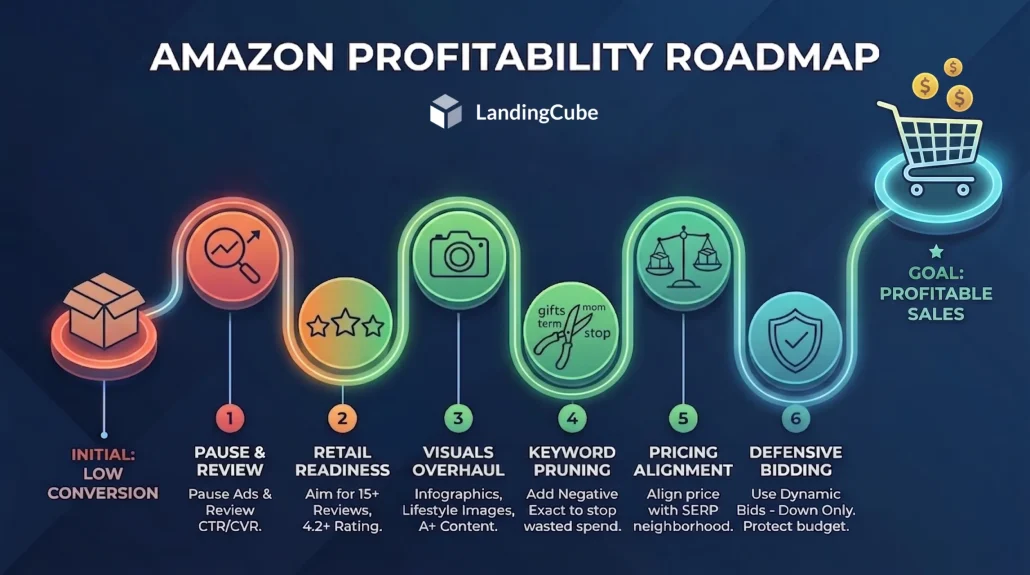
Diagnosing why your Amazon ads are failing to convert is rarely a comfortable process because the data usually points to an operational flaw rather than a software glitch. It requires you to review your product, pricing, and presentation from the shopper’s point of view.
If your campaigns are spending without sales, pause and review the listing before increasing the budget. Address the retail readiness of your listing, heavily prune your search term reports for negative keywords, ensure your pricing aligns with the reality of the search engine results page, and reset your bidding strategies to a defensive posture. Once you have patched the holes in your bucket, you can turn the advertising hose back on and watch your clicks finally translate into sustainable, profitable sales.
FAQ: All The Reason Why Amazon Ads Didn’t Convert
Look at your Click-Through Rate (CTR) and Conversion Rate (CVR). If your CTR is high (above 0.5%) but your CVR is low (under 5%), your ad is working perfectly by generating interest, but your listing is failing to convince the shopper to buy. If your CTR is abysmal (under 0.1%), the problem is the ad targeting or your main image.
While it varies wildly by category and price point, a healthy conversion rate for an established, retail-ready product on Amazon generally hovers between 9% and 12%. If your conversion rate on an exact match keyword drops below 5%, you are likely losing money on every click and need to optimize the listing.
Yes. If you know your product has a 3.2-star rating or your images are outdated, you are actively burning cash by running ads. Pause your campaigns, fix the fundamental issues on the product detail page, gather a few positive reviews, and then relaunch the ads from a position of strength.
This happens when you run Automatic campaigns or use Broad Match manual targeting without a solid negative keyword strategy. Amazon’s algorithm tests related concepts based on your listing copy. You must use the Search Terms report to find these unrelated keywords and add them as “Negative Exact” matches to stop the bleeding.
While there is no hard mathematical rule, industry best practices dictate that you should aim for at least 15 to 20 positive reviews before you heavily fund top-of-search PPC campaigns. Anything less, and your conversion rate will likely be too low to offset the rising cost of clicks.
Do not make emotional decisions based on two or three clicks. You must wait for statistical significance. A common rule is to wait until a keyword accrues enough spend to equal your target Cost Per Acquisition (CPA), or wait until it hits roughly 15 to 20 clicks without a sale. Once it crosses that threshold, negative match it.
Amazon shoppers are highly price-sensitive and constantly compare your listing to competitors on the same page. If you raise your price without simultaneously adding perceived value (like better A+ content or a new feature), shoppers will click your ad, see the higher price, and bounce to a cheaper alternative.
Retail Readiness is an industry term describing a product listing that is fully optimized to convert traffic. A retail-ready listing has a minimum of 15 reviews, a star rating of 4.0 or higher, 6 to 7 high-resolution images including infographics, fully optimized bullet points, A+ content, and healthy inventory levels.
No. Changing your bidding strategy from “Up and Down” to “Down Only” will lower your overall ad spend and protect your budget, but it will not magically make shoppers buy a product they don’t want. Bidding strategies control your financial exposure; your listing controls your conversion rate.
The most common reasons ads suddenly stop delivering impressions are: you ran out of inventory, your daily budget is too low and is exhausted immediately at midnight, or you lost the Buy Box to a hijacker or price suppression. Check your inventory and Buy Box win percentage immediately.
RANK LIKE THE PROS
Discover a better way to rank products from external traffic, like Facebook, Google and TikTok, with LandingCube promo pages.
Try it free for 21 days.