

Aug 12th 2026
Resources
- Facebook Ads for Amazon [Video Course]
- Drive Traffic To Amazon [Ultimate Guide]
- Get More Amazon Reviews [Ultimate Guide]

TL;DR
What does Amazon bullet point optimization actually need to achieve?
Great bullets have to satisfy both Amazon and the shopper: they add relevant product information for search while making the buying decision easier. The real challenge is balancing discoverability, clarity, differentiation, and conversion without turning five bullets into keyword storage.
How should all five Amazon bullet points work together?
Give every bullet a different job instead of repeating the same selling point five ways. Lead with the strongest buying reason, then use the remaining space to address differentiation, fit or compatibility, supporting evidence, and any final information that reduces purchase uncertainty.
What makes a keyword worth putting into an Amazon bullet?
Relevance matters more than simply chasing search volume. The strongest keywords naturally describe a genuine feature, material, size, use case, or customer need; if an exact phrase makes the copy awkward or repetitive, forcing it into the bullet usually makes the listing worse.
What do Amazon’s current bullet point rules change for sellers?
Amazon now favors short, structured, product-specific bullets rather than decorative or promotional copy. Current guidance covers length, headers, capitalization, claims, repetition, keywords, special characters, guarantees, and prohibited seller or shipping information—so old listing-writing tricks can now create compliance problems.
Amazon bullet point optimization is the process of improving the “About this item” section of your product listing so that it does three jobs at once: helps Amazon understand what your product is relevant to, gives shoppers the information they need to make a buying decision, and makes the differences between your product and competing options immediately clear.
The mistake is treating those three jobs separately.
A seller may stuff the bullets with search terms and end up with copy nobody wants to read. Another may write beautiful marketing copy that leaves out the dimensions, compatibility details or product terminology shoppers actually search for. Both listings have technically been “optimized,” yet neither is particularly useful.
Table of Contents
- How Amazon Bullet Points Affect Search Visibility and Conversions
- Tools & Steps for Effective Bullet Point Copy Research
- What Each of Your Five Amazon Bullet Points Should Do
- How to Add Keywords to Amazon Bullet Points Without Keyword Stuffing
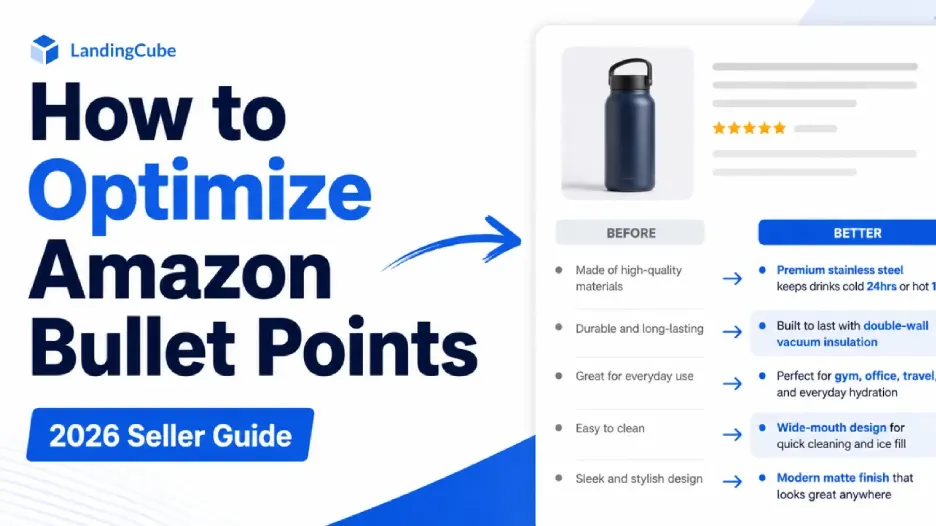
- Amazon Bullet Point Optimization: Before and After
- How to A/B Test Amazon Bullet Points
- Amazon Bullet Point Requirements and Best Practices in 2026
- Amazon Bullet Point Optimization Checklist
- Why Are My Amazon Bullet Points Not Showing or Updating?
- Final Thoughts
- FAQs: All About Amazon Bullet Point Optimization
Good bullet points sit in the middle. They use the language customers use while answering the questions customers actually have.
Amazon allows sellers to include up to five bullet points on a product listing, while its own guidance repeatedly emphasizes concise, product-specific information and connecting product features with their practical benefits.
This guide shows you how to do that systematically: from keyword research and bullet order to Amazon’s current content requirements, mobile readability, testing and the mistakes that can turn seemingly optimized bullets into worse copy.
How Amazon Bullet Points Affect Search Visibility and Conversions
Amazon bullet points have two jobs: they help shoppers understand whether a product is right for them, and they give Amazon additional product information that can help connect the listing with relevant searches.
On the search side, Amazon recommends using words customers are likely to use when looking for a product. Relevant search terminology can describe features, materials, sizes, uses and other attributes, and Amazon specifically says sellers can use queries found in their advertising Search Term Reports in product titles, bullet points and product descriptions.
That does not mean repeating the same keyword five times will make a listing five times more relevant.
Imagine you sell a stainless steel insulated water bottle and the title already clearly identifies it as a “32 oz stainless steel insulated water bottle.” Your bullets do not need to repeat that complete phrase again and again. Instead, they can add useful information around the product:
- Double-Wall Insulation: Helps maintain drink temperature during long workdays and workouts
- Leak-Resistant Lid: Designed for carrying in gym bags, backpacks and everyday totes
- 32 oz Capacity: Holds enough water for longer periods between refills
- Stainless Steel Construction: Durable metal body designed for regular everyday use
Each bullet gives Amazon and the shopper more context about the product without turning the listing into a collection of search terms.
Amazon’s current guidance is explicit about this balance: use clear, natural language and avoid stuffing unnecessary keywords or phrases into the bullets. Amazon also recommends minimizing unnecessary duplication across listing attributes and using the space to provide additional information that helps the customer make a more informed decision.
Relevance Is Not the Same as Ranking Position
Including a relevant search term can help Amazon understand how your product relates to a shopper’s query. It does not guarantee that the ASIN will rank highly for that query.
Organic placement depends on more than whether a phrase appears in a bullet point. For this reason, sellers should think about bullet-point SEO as relevance optimization, not as a formula where a particular keyword position automatically creates a particular ranking.
There is also no need to force your most important keyword into the first few words of every bullet. The beginning of a bullet is valuable because shoppers scan quickly, so use that space for the information that matters most to the buying decision. If a relevant keyword fits naturally there, use it. If it does not, clarity should win.
Bullet Points Also Need to Help the Shopper Buy
Search visibility is only half the job.
Once a shopper reaches the product page, the bullets should help answer the questions standing between that shopper and a purchase. Amazon recommends using bullet points for information such as contents, uses, dimensions, operational considerations, age ratings, skill levels and country of origin, and recommends at least three concise bullets.
That means a good bullet may sometimes prioritize a piece of information with almost no SEO appeal.
If a replacement cable only works with certain devices, compatibility may be more important than an additional keyword variation. If a fitted sheet only accommodates mattresses up to a particular depth, that measurement may be more valuable than another lifestyle benefit.
The best Amazon bullet points therefore do not choose between SEO and conversion. They communicate the product accurately in the language customers use while making the buying decision easier.
The goal is not maximum keyword density. It is maximum useful relevance.
RANK LIKE THE PROS
Discover a better way to rank products from external traffic, like Facebook, Google and TikTok, with LandingCube promo pages.
Try it free for 21 days.
Tools & Steps for Effective Bullet Point Copy Research
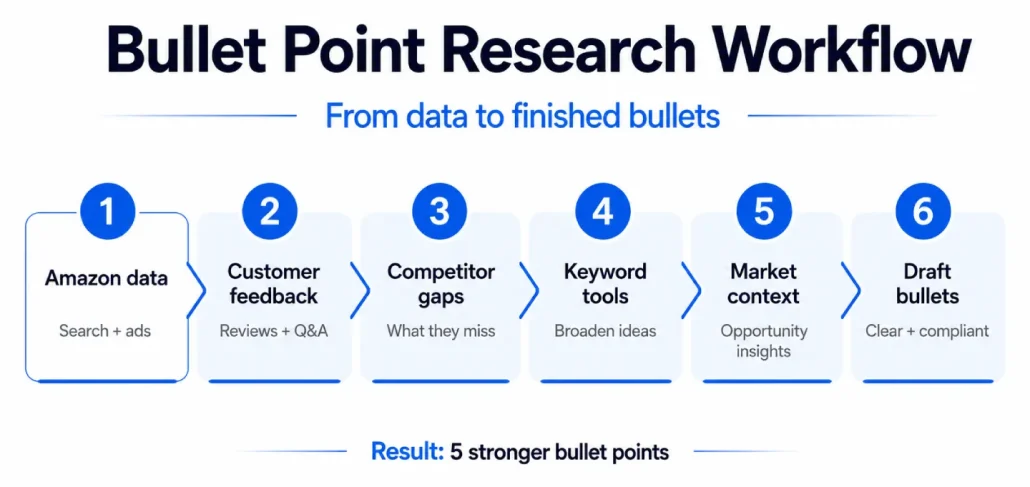
Strong Amazon bullet points should not begin with a blank document and a copywriter trying to invent five benefits. Start with evidence.
The most useful inputs normally come from three places:
- Amazon’s own search and advertising data
- Actual customer feedback
- Competitive research.
Third-party Amazon SEO tools can then help broaden that research.
1. Start With Amazon’s First-Party Search Data
If your brand is enrolled in Amazon Brand Registry, Brand Analytics should be one of your first stops.
The Search Query Performance dashboard shows which customer queries are leading shoppers to your products and provides metrics across stages such as impressions, clicks, cart adds and purchases. Sellers can also look at brand-level and ASIN-level performance, making the report particularly useful when deciding which search language genuinely matters to a particular product.
Do not simply take the highest-volume query and force it into Bullet 1. Look for search terms that are both relevant to the ASIN and closely connected to what the shopper actually needs to know.
The Top Search Terms dashboard provides a broader market view. Amazon says it shows popular search terms, search-frequency rank and top-clicked products associated with those searches. It can help you understand how shoppers describe the category and which products are winning attention for important queries.
If you run Amazon Ads, also review your Search Term Report. This is particularly valuable because it shows the actual queries customers used around your advertising. Amazon explicitly recommends using relevant queries from this report to inform titles, bullet points and product descriptions.
Together, these reports are considerably more useful than guessing which words “sound like Amazon keywords.”
2. Mine Customer Reviews, Questions and Recurring Objections
Keywords tell you what customers search for. Reviews and questions tell you what customers care about once they start evaluating products. (Here’s to get more Review)
Read your own reviews first. Look for recurring praise, confusion, complaints and unexpected use cases. Then do the same with comparable competing products. You are not looking for sentences to copy. You are looking for patterns.
If customers repeatedly praise how easily a bottle fits into standard cup holders, that may deserve a bullet. If shoppers regularly complain that competing organizers are smaller than expected, dimensions should probably appear prominently. If buyers repeatedly ask whether an accessory works with a particular device generation, compatibility may deserve Bullet 1 rather than Bullet 5.
Reviews are especially useful for uncovering the language customers naturally use to describe those benefits and concerns.
Turn those insights into factual, product-specific copy rather than exaggerated claims. For example:
- Durable Construction: Powder-coated steel frame designed to withstand everyday use
is stronger than:
- DURABLE BUILD: Unbreakable professional-quality construction that lasts forever
The first describes a concrete product attribute. The second creates claims the product may not be able to support.
3. Use Competitor Listings to Find Information Gaps
Competitor research can be useful, but do not assume a high-ranking product automatically has excellent bullet points.
A successful ASIN may perform well for many reasons. Instead of copying the wording from Best Seller or Amazon’s Choice products, compare several products that consistently compete for your important search queries.
Ask:
- What information do most of them mention?
- What information do they bury?
- Which customer questions do their reviews reveal?
- Which genuine differentiators does your product have that their bullets fail to address?
Your goal is not to create a slightly rewritten version of the market leader’s listing. It is to understand the standard information customers expect in the category and then identify where your own product can communicate something more useful.
4. Use Third-Party Keyword Tools as a Supplement
RANK LIKE THE PROS
Discover a better way to rank products from external traffic, like Facebook, Google and TikTok, with LandingCube promo pages.
Try it free for 21 days.
Tools such as Helium 10, Jungle Scout, MerchantWords and Data Dive can help broaden keyword discovery, perform reverse-ASIN research and identify terminology associated with competing products.
Treat these tools differently from Amazon’s first-party data.
Third-party search-volume and competitive metrics are proprietary estimates rather than direct Amazon Search Query Performance data. They are valuable for discovery, but they should not automatically override what you can learn from your own Amazon search, advertising and conversion data.
Use them to build a larger candidate keyword set. Then decide which terms deserve space in the bullets based on relevance to the actual product and buying decision.
5. Use Product Opportunity Explorer for Customer-Need Research, Not Just Keywords
Product Opportunity Explorer can provide another useful layer of research, particularly when you want to understand unmet customer needs rather than simply collect keywords.
Amazon describes the tool as a way to analyze search, purchase, review and pricing trends and identify unmet demand. In 2026, Amazon continues to position Product Opportunity Explorer primarily as a product and market-opportunity tool.
For bullet-point optimization, use it selectively.
If the data shows a recurring unmet need that your product genuinely addresses, that insight may influence which benefit or use case deserves greater prominence. But for query-level bullet optimization, Search Query Performance, Top Search Terms and advertising search-term data should generally be more direct sources.
6. Use AI for Drafting, Not Fact Creation
AI can be useful when you already know what the bullet needs to say.
For example, you might provide an AI writing tool with:
- the verified product specifications
- five customer priorities
- relevant search terms
- the required Amazon bullet-point format
- your brand voice
- claims or phrases that must not be used
and ask it to produce several alternative versions.
Amazon itself now provides generative-AI listing tools. Sellers can use Amazon’s listing creation tools to generate titles, product-related bullet points and descriptions from product information, images or existing webpages. In July 2026, Amazon also highlighted Enhance My Listing, which analyzes existing listings and generates recommendations sellers can review, customize, accept or decline.
Whether you use Amazon’s tools, ChatGPT or another platform, the same rule applies: AI should reorganize verified facts, not invent them.
Do not ask an AI system to create certifications, health benefits, performance figures or comparative claims that you have not supplied and verified. Provide the actual product specifications and approved claims.
What Each of Your Five Amazon Bullet Points Should Do
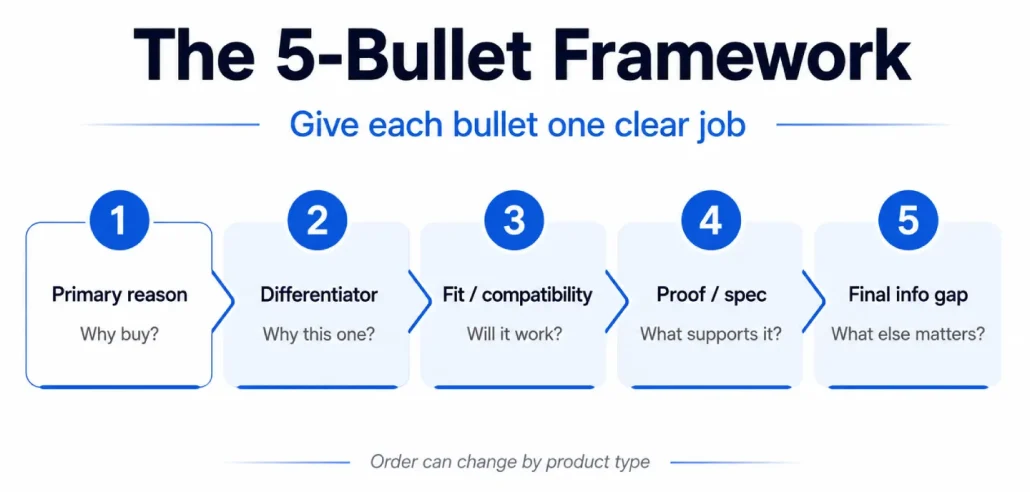
The five fields should not feel like five variations of the same sentence. Give each one a job.
Bullet 1: Answer “Why should I care about this product?”
This is your strongest selling point.
For some products that will be the outcome:
Fast-heating 1,500 W element brings water to temperature quickly for busy mornings
For others it will be compatibility:
Designed for iPhone 17 Pro with precise button, camera and charging-port access
And for products where size is the deciding factor, it may be fit:
Fits mattresses up to 16 inches deep with an elasticized edge that stays securely in place
Do not automatically lead with the keyword with the highest search volume. Lead with the information most likely to move the buying decision.
If the keyword fits that sentence naturally, excellent. If it doesn’t, give it another home.
Bullet 2: Explain the biggest differentiator
Now answer:
Why this one rather than the other ten products the shopper has open?
Specificity matters here.
“High quality” is not a differentiator.
“18/10 stainless steel cooking surface compatible with induction, gas and electric cooktops” might be.
“Designed with a detachable 24 oz pulp container so you can juice several servings before emptying it” might be.
The important part is that the difference must be real.
A useful exercise is to remove your brand name from the bullet and ask whether five competitors could truthfully make the exact same statement. If they could, the copy probably isn’t differentiated enough.
Bullet 3: Remove a fit or compatibility concern
Many Amazon purchases fail before they begin because the shopper isn’t sure whether the product is right for them.
- Will it fit?
- Will it work with my device?
- Is it safe for this surface?
- How large is it?
- What age or skill level is it for?
- What does the package actually contain?
Amazon’s own bullet guidance specifically calls out dimensions, contents, use, operational considerations and similar product-specific information as useful material for the bullet section.
Do not hide that information in the description just because it isn’t glamorous.
A sentence that prevents someone from ordering the wrong size may be more commercially useful than your cleverest brand message.
Bullet 4: Prove the promise
This is a natural place for evidence that helps the customer evaluate what you have already told them.
If an earlier bullet says the product is built for everyday use, what specific product attribute supports that statement?
It could be the material, capacity, construction, battery rating, dimensions or another measurable specification.
Instead of:
Extremely durable design for years of use
you might write:
Steel Frame: Powder-coated steel construction supports up to 300 lb
assuming the material and load rating are accurate for the product.
Amazon’s current bullet-point guidance advises sellers to avoid subjective, performance and comparative claims unless they are verifiable on the product packaging, and it specifically tells sellers not to compare their product with competitor brands.
That makes product facts much safer and usually much more persuasive than unsupported superlatives.
“1,500 W motor” tells the customer what the product has.
“Most powerful vacuum on Amazon” asks the customer—and Amazon—to take your word for it.
Use the first approach wherever possible.
Bullet 5: Close the remaining information gap
The final bullet is a useful place to answer an important question that has not yet been covered.
Depending on the product, that could include package contents, care instructions, installation information, accessories or legitimate manufacturer warranty information.
For example:
In the Box: Includes bottle, leak-resistant lid and cleaning brush; removable components are top-rack dishwasher safe
or, where a genuine product warranty applies:
Manufacturer Warranty: Covered by a two-year manufacturer warranty; see warranty terms for coverage details
Be careful not to confuse factual manufacturer warranty information with promotional refund or satisfaction guarantees. Amazon’s updated bullet-point requirements restrict refund-related guarantee language such as unconditional refunds or “send it back if not satisfied” claims.
The final bullet does not need to be exciting. It needs to close a real information gap.
Important Note: Put Decision-Critical Information First
Amazon’s product-detail layouts can vary by device and change over time, so do not build your bullet strategy around the assumption that every shopper will consume all five bullets equally.
Instead, assume attention falls as the shopper moves down the list.
Put your strongest buying information early. That could mean the principal benefit, an important compatibility requirement, a critical dimension or another fact that determines whether the product is suitable.
Save secondary care information, package details or supporting features for later unless one of those details is itself essential to the purchase.
Then review the listing on a phone.
Read only the beginning of each bullet and ask whether you can still understand why the product is worth considering and whether it fits your needs.
If the first words of every bullet are generic phrases such as “Designed with quality in mind” or “Perfect for modern lifestyles,” you are wasting valuable attention. Start where the useful information starts.
How to Add Keywords to Amazon Bullet Points Without Keyword Stuffing
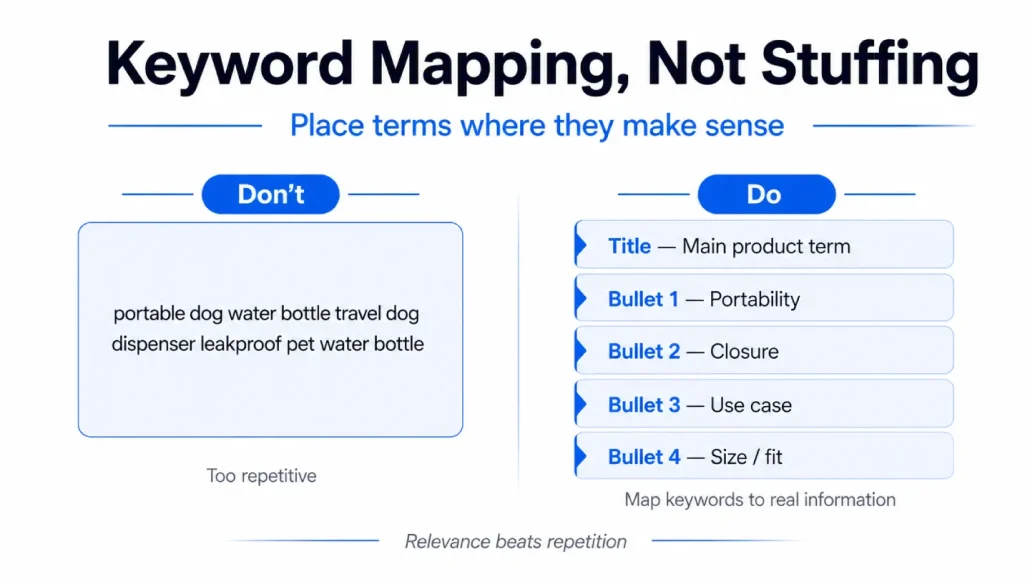
The best way to optimize Amazon bullet points for keywords is to build a keyword map before you start writing.
Take the phrases you uncovered from Amazon Brand Analytics, advertising search-term reports, competitor research and your other keyword tools, then group them by meaning.
Suppose you sell a travel dog water bottle. Your research might surface variations around:
- dog water bottle
- portable dog water bottle
- travel water dispenser for dogs
- leakproof pet water bottle
- dog hiking accessories
- puppy travel bottle
Those should not become:
Portable dog water bottle travel water dispenser for dogs leakproof pet water bottle for dog hiking accessories…
That’s technically rich in keywords and commercially terrible. Instead, map the concepts to different customer questions.
The primary phrase may already belong in the title. A portability variant can appear naturally in the first bullet. “Leakproof” belongs with the closure mechanism. “Hiking” belongs with the use-case sentence. “Puppy” should only appear if the product genuinely suits puppies.
Amazon recommends using relevant search terminology relating to features, materials, size and use, and it explicitly allows relevant terms to be incorporated into bullet points. The key word there is relevant.
Don’t sacrifice meaning to preserve an exact-match phrase
You are writing product copy, not a crossword puzzle.
If the exact search query sounds awkward inside a sentence, use the normal way a customer would describe the idea. Amazon’s own search-term guidance notes that its systems account for aspects such as pluralization and capitalization in search terms.
The shopper should never be able to see where your SEO tool ended and your copywriter began.
Minimize Repetition Without Hiding Important Information
As of July 27, 2026, non-media titles generally need to be 75 characters or fewer, while Item Highlights provides another 125 searchable characters for materials/use cases.
Your product title and bullet points should work together, not repeat one another word for word.
Amazon’s current bullet-point guidance recommends removing or minimizing duplication across listing attributes and using the space to provide additional or supporting information that helps customers make a more informed decision.
That does not mean an important product fact can appear only once.
Amazon’s own advertising guidance says important information from the title or description can be reiterated in bullet points where appropriate. Use judgment.
If compatibility with a specific device is critical to avoiding a wrong purchase, repeating that compatibility information in both the title and a bullet may improve the listing. If the full primary keyword already appears naturally in the title, repeating the exact phrase in every bullet usually adds much less value.
A useful test is to highlight repeated information across your title and bullets.
For every repetition, ask: Does seeing this information again make the buying decision easier? If yes, keep it. If not, use the space to tell the customer something new.
Amazon Bullet Point Optimization: Before and After
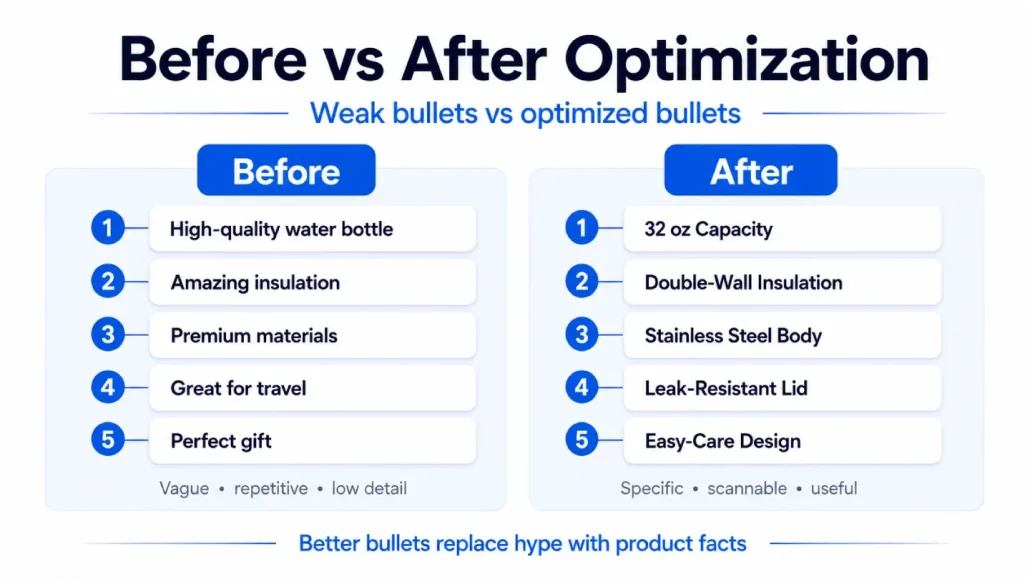
It is easier to understand bullet-point optimization when you look at all five bullets as a system rather than five isolated sentences.
Imagine you are selling a 32 oz insulated stainless steel water bottle.
Before Optimization
- High-quality water bottle that is perfect for everyday use
- Amazing insulation keeps your drinks cold for a long time
- Durable construction and premium materials
- Leakproof design is great for gym, travel and outdoor activities
- Easy to clean and makes a perfect gift
There are no obvious walls of keywords here, but the bullets still do a poor job.
“High quality,” “amazing,” “premium” and “great” say very little. Several bullets make broad promises without explaining the product feature behind them. The capacity is missing. The material is barely described. Important product information competes with generic marketing language.
Now reorganize the same listing around actual buying questions.
After Optimization
- 32 oz Capacity: Holds enough water for longer workouts, commutes and everyday use between refills
- Double-Wall Insulation: Insulated construction helps maintain drink temperature throughout the day
- Stainless Steel Body: Durable metal construction designed for regular everyday use
- Leak-Resistant Lid: Secure screw-on closure helps reduce leaks when carried in gym bags and backpacks
- Easy-Care Design: Wide bottle opening makes it easier to add ice and clean the interior
Assuming each statement accurately describes the product, the second version gives shoppers considerably more useful information.
What Changed?
- The bullets now have five different jobs. Capacity, insulation, construction, portability and cleaning each receive their own space.
- The strongest facts moved forward. The customer immediately knows the size and principal product function.
- Adjectives were replaced with product information. “Premium” became stainless steel. “Amazing insulation” became a description of the actual insulation construction.
- Search language now fits the subject matter. Terms such as “32 oz,” “insulated,” “stainless steel” and relevant use cases can appear naturally because they describe real product attributes.
- The bullets are easier to scan. Each begins with a descriptive header and moves immediately into the information behind it.
- Nothing requires a competitor comparison. The product can sound compelling without claiming it is “20% better” or “the best bottle on Amazon.”
That is the difference between adding keywords to a listing and actually optimizing the bullet points.
How to A/B Test Amazon Bullet Points
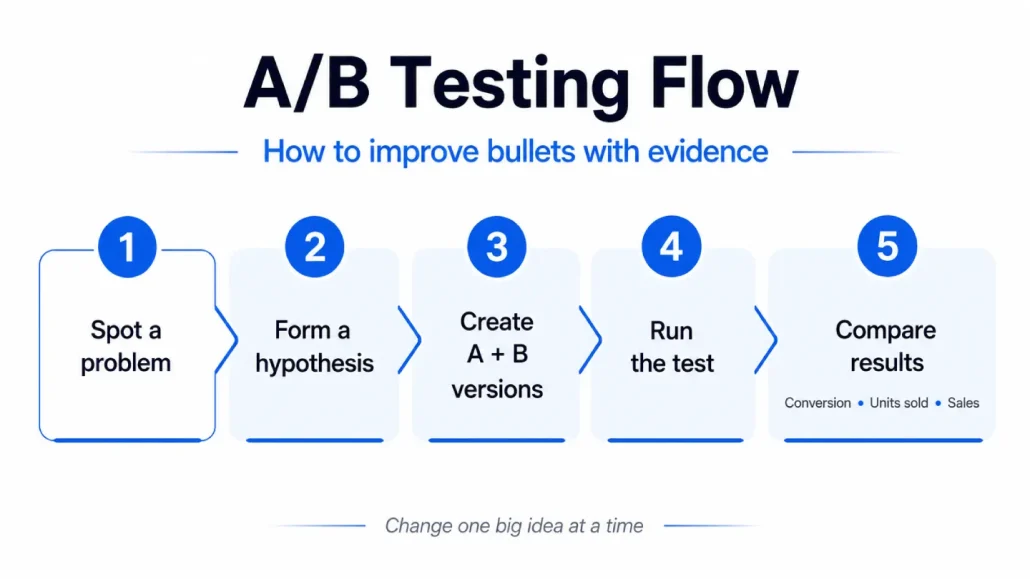
Once your listing has enough traffic, you do not have to rely entirely on opinion when deciding whether one set of bullet points is better than another.
Eligible sellers can use Amazon Manage Your Experiments to test different versions of product-detail content, including bullet points. Amazon randomly divides customers who visit the detail page into groups that see different versions, then reports outcomes including conversion rate, units sold and sales.
To use Manage Your Experiments, Amazon currently requires a Professional selling account and Brand Representative status for a brand enrolled in Amazon Brand Registry. The product itself must also belong to the enrolled brand and have enough recent traffic to generate valid experiment results.
That makes bullet optimization measurable for eligible ASINs rather than purely subjective.
A good experiment begins with a hypothesis.
For example:
A shorter set of bullets that moves compatibility and the primary benefit into bullets one and two will improve conversion because shoppers can understand fit and value more quickly
Version B should then make that idea meaningfully different from Version A.
Amazon recommends testing substantially different content and letting experiments run to completion rather than declaring a winner from early fluctuations. Manage Your Experiments also supports multi-attribute testing when sellers intentionally want to test several page elements together.
What If Your ASIN Isn’t Eligible for Manage Your Experiments?
Not every seller or ASIN qualifies for Manage Your Experiments. If you cannot run an Amazon experiment, you can still measure listing changes, but you need to be much more careful about causality.
Record the date of the bullet-point update and compare relevant metrics over sensible periods before and after the change. For Brand Registry sellers, Search Query Performance can help you monitor query-level impressions, clicks, cart adds and purchases for relevant searches.
Also watch broader business metrics such as sessions and conversion where available. The important limitation is that this is not a controlled A/B test.
Advertising changes, price, promotions, reviews, inventory, seasonality, competitor activity and organic ranking movements may all change at the same time. If conversion improves after you rewrite your bullets, that is useful evidence—but it does not automatically prove the bullet rewrite caused the entire improvement.
Where possible, avoid making several major listing and commercial changes on the same day if your objective is to understand the impact of the bullet update.
Amazon Bullet Point Requirements and Best Practices in 2026
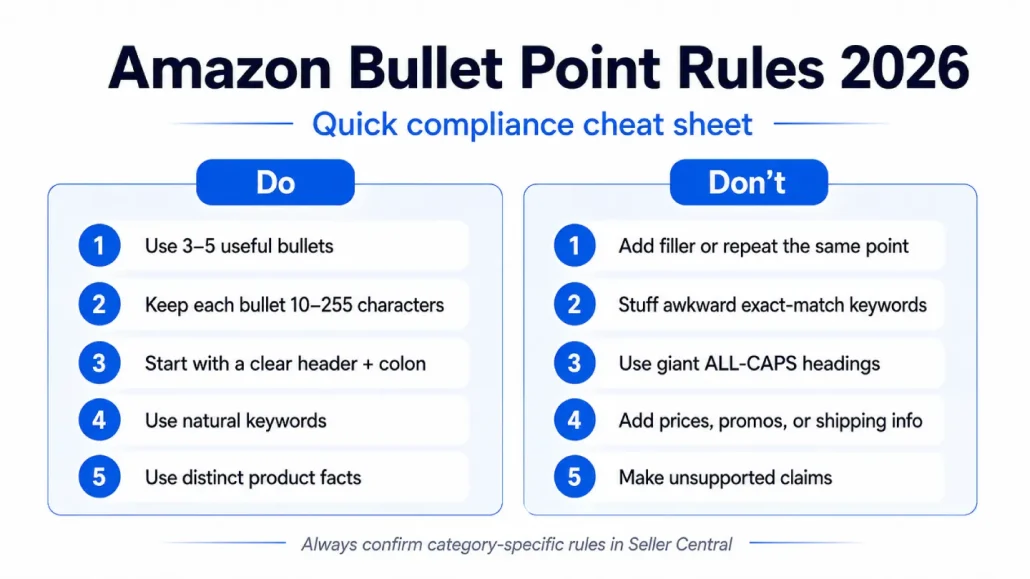
Amazon bullet-point advice has changed over time, which is why sellers can still find conflicting recommendations online.
The most important distinction is between Amazon requirements and optional copywriting tactics.
In August 2024, Amazon announced updated product bullet-point requirements designed to standardize listings and make product information easier for customers to compare. The update restricted special characters, emojis and certain phrases, including refund-related guarantees. Amazon also said it would use generative AI as part of its listing-quality process to identify non-compliant content and generate suggested improvements for seller review.
Current Seller Central guidance provides a much clearer baseline for how bullets should be written.
How Many Bullet Points Should You Use?
Amazon’s current listing materials allow sellers to provide up to five product bullets, while Amazon guidance recommends including at least three and ideally using five when you genuinely have five useful pieces of information to communicate.
Do not create filler simply to occupy all five fields. Each bullet should add distinct product information.
What Is the Current Amazon Bullet Point Character Limit?
Amazon’s current general bullet-point guidance says each bullet should contain more than 10 but fewer than 255 characters. Treat that as the current general rule rather than a writing target.
A bullet that communicates its point clearly in 140 characters does not become better because you stretch it to 250.
Amazon categories and listing templates can have additional requirements, so check the fields and instructions shown for your specific product in Seller Central before publishing.
Use a Descriptive Header Followed by a Colon
Amazon currently recommends beginning each bullet with a descriptive header followed by a colon and then the supporting information.
For example:
Battery Life: Up to 40 hours of listening between charges
rather than:
ULTRA-LONG BATTERY LIFE – Enjoy amazing power all day long!
Amazon’s own current example uses normal capitalization rather than oversized ALL-CAPS headings.
This creates a predictable structure that shoppers can scan quickly without relying on decorative formatting.
Begin With a Capital Letter and Avoid End Punctuation
Amazon’s current guidance says bullets should begin with a capital letter and be written as sentence fragments without ending punctuation. If a bullet contains multiple phrases, Amazon recommends separating them with semicolons.
That means the bullet does not need to read like a paragraph.
Keep the structure compact.
Follow Amazon’s Number and Measurement Formatting
Current Seller Central guidance says to write numbers one through nine in words, except where they are part of names, model numbers or measurements.
Amazon also instructs sellers to include a space between a digit and a measurement, such as:
100 ml
rather than:
100ml
Review technical examples throughout your listing so that measurement formatting is consistent.
Give Each Bullet Unique Product Information
Amazon’s current requirements specifically warn against repetition between bullets and recommend minimizing unnecessary duplication across listing attributes such as the title and product description.
This does not mean you can never repeat an important detail. Amazon separately advises sellers that important information from the title or description may be reiterated where useful.
The practical rule is simple: repeat information when doing so helps the shopper; do not repeat it merely to fill space or insert the same keyword again.
Use Keywords Naturally
Amazon recommends using relevant search terms that describe features, materials, sizes, uses and other genuine product attributes. It also specifically recommends using relevant customer queries from the Amazon Ads Search Term Report in titles, bullet points and product descriptions.
However, current Seller Central guidance also tells sellers to use clear, natural language and avoid stuffing unnecessary keywords or phrases into bullet points. So there is no reason to sacrifice readability to preserve an awkward exact-match phrase.
Write for the customer first, then make sure the terminology customers actually search for is represented naturally.
Avoid Emojis and Restricted Special Characters
Amazon’s August 2024 requirements restricted emojis and certain special characters in product bullets. Amazon’s current prohibited examples include:
- Symbols such as ™, ®, ©, €, £ and ¥, and that sellers should check Seller Central for the live list.
- Amazon’s current requirements also flag placeholders such as N/A or TBD
- Specific restricted claims including “eco-friendly,” “anti-microbial” and “anti-bacterial.”
Do not use decorative symbols simply to attract attention. A bullet should stand out because the information is useful and well ordered.
Do Not Include Promotional, Pricing or Shipping Information
Amazon’s guidance says bullet points should focus on product information rather than offers or seller-specific messaging.
Do not use the bullets for:
- sale or discount language
- prices
- limited-time promotions
- seller or company information
- external URLs or contact details
- shipping information
Amazon specifically states that seller, company and shipping information should not appear in product bullet points.
“Made in the USA,” where accurate and permitted, describes the product’s country of origin.
“Ships directly from the USA” describes fulfillment or shipping and does not belong in the bullet section.
Be Careful With Guarantees
Amazon’s updated requirements specifically restrict refund-related guarantee language.
Examples Amazon identifies as prohibited include unconditional refund promises and language telling customers to return the item for a full refund if they are not satisfied.
A legitimate manufacturer warranty is different from a seller-created money-back promise, but it still needs to be accurate and applicable to the specific product.
Avoid Unsupported Performance and Comparative Claims
Current Seller Central guidance tells sellers to avoid subjective, performance and comparative claims unless they are appropriately verifiable and specifically instructs sellers not to compare their product with competitor brands.
That makes:
Motor Power: 1,500 W motor for everyday carpet and hard-floor cleaning
a much safer structure than:
MOST POWERFUL MOTOR: 20% stronger than leading competitors
The first gives the customer a measurable product specification.
The second introduces a comparative claim that requires evidence and may violate Amazon’s content requirements.
Amazon also advises sellers to support accolades and award claims with details such as the date and awarding body, and to substantiate consumer-survey claims with the source and date.
Keep the Product, Not the Brand Story, at the Center
Amazon’s bullet guidance says to highlight product features and benefits rather than using the space for the brand’s marketing story.
Your bullets should therefore answer practical buying questions such as:
- What does it do?
- What is it made fr