driving traffic to your amazon listing

How to Create Amazon Ad Campaigns: The Complete Guide for New Sellers

How to drive external traffic to your Amazon listing, so you can grow your sales and improve your rankings.

To create Amazon ad campaigns, log into Seller Central and go to Advertising > Campaign Manager. Click “Create Campaign,” choose your ad type (Sponsored Products is the best starting point for most sellers), set your campaign name, daily budget, targeting type, and bids, then launch. 

Table of Contents


Optimize weekly by reviewing your Search Term Report, adding negative keywords, and moving top-converting search terms into manual exact-match campaigns. Knowing how to create Amazon ad campaigns is the most important paid skill for any FBA seller who wants consistent, scalable growth. 

This guide covers everything from understanding your campaign types and setting up your first Sponsored Products campaign to targeting decisions, bidding strategies, and the optimization habits that keep your ad spend profitable, with LandingCube helping you build the tools around it.

What Are Amazon Ad Campaigns?

Welcome to the complete guide on how to increase external traffic to your Amazon Store and product Amazon advertising campaigns are paid promotions that put your products in front of shoppers on Amazon. Most Amazon ad types use a pay-per-click (PPC) model, which means you only pay when a shopper actually clicks your ad, regardless of how many times it appears in search results.

You manage all of your campaigns from the Amazon Advertising Console, the central dashboard for campaign creation, budget management, and performance tracking. Inside it, you monitor metrics like ACoS (Advertising Cost of Sales), TACoS (Total Advertising Cost of Sales), and ROAS (Return on Ad Spend) to gauge whether your campaigns are profitable.

Beyond driving sales directly, every Amazon PPC campaign also sends ranking signals to Amazon’s A9 algorithm. When paid ads generate sales for a specific keyword, Amazon registers your product as relevant for that search term and gradually moves your organic listing higher on the page. 

This feedback loop between paid traffic and organic rank is the foundation of every strong Amazon advertising strategy, and it is why running ads, even at break-even ACoS, is a smart investment for new products.

Types of Amazon Ad Campaigns

Before you begin your Amazon ad campaign setup, you need to know which campaign type fits your current goal. Amazon offers three core on-platform ad types:

Sponsored Products

Sponsored Products are the go-to ad type for Amazon FBA advertising and the right starting point for almost every seller. These ads promote individual product listings and appear at the top of search results and on competitor product detail pages. 

Because they blend in with organic results, they consistently deliver strong click-through and conversion rates. Any active Professional Seller account can run Sponsored Products without Brand Registry.

Sponsored Brands

Amazon Sponsored Brands are banner ads that sit above organic search results and feature your brand logo, a custom headline, and up to three products. Running this ad type requires enrollment in Amazon Brand Registry

Sponsored Brands work best for protecting your brand’s search real estate, building awareness, and showcasing a product line rather than a single ASIN.

Display Ads

Amazon Display ads reach shoppers both on and off Amazon through product and audience-based targeting. Like Sponsored Brands, running Display requires 

Amazon Brand Registry enrollment. You can retarget shoppers who viewed your listing but did not buy, or target buyers browsing similar product categories. 

Display works best as a supporting campaign that recaptures near-buyers once your Sponsored Products campaigns are already running well.

Streaming TV

Amazon Streaming TV ads are full-screen, non-skippable video ads that appear before, during, or after premium entertainment content. These ads run across Prime Video, Freevee, Twitch, Fire TV Channels, and top third-party network apps.

Because they reach viewers directly on smart TVs, gaming consoles, and mobile devices, they are ideal for capturing attention outside of the traditional shopping journey. Streaming TV works best as a top-of-funnel campaign to build massive brand awareness and expand your audience reach, typically requiring access through the Amazon Demand-Side Platform (DSP) rather than the standard seller advertising console.

Before You Create Your First Campaign: A Pre-Launch Checklist

Spending money on ads before your product and account are ready is one of the fastest ways to waste your budget. Before you launch any Amazon ad campaign, work through this checklist:

  1. Optimize your listing. 

Your product listing is the landing page for every campaign you run. Make sure your title leads with your primary keyword, your images are high-resolution and show the product clearly, your bullet points lead with benefits rather than features, and your price is competitive with the top organic results for your main keyword.

  1. Do your keyword research. 

You need to know exactly what shoppers are searching for before you set up any Amazon keyword targeting. Use Amazon Brand Analytics, your Search Term Report, or a third-party research tool to build your starting keyword list. For a full step-by-step walkthrough, see the guide on Amazon keyword research and SEO.

  1. Define your goal for each campaign. 

New product launch ads call for broad discovery, which points to automatic targeting. Defending organic rank calls for manual exact-match campaigns. Clearing slow-moving inventory calls for a lower ACoS target with tighter keyword targeting.

  1. Calculate your target ACoS. 

Your target Amazon ACoS should sit at or below your gross profit margin. If your margin is 40%, any ACoS at or below 40% means your campaigns are at least breaking even financially while improving your organic rank through increased sales velocity.

How to Create an Amazon Sponsored Products Campaign Step by Step

Here is how to create an Amazon ad campaign for Sponsored Products from start to launch:

Step 1: Open Campaign Manager 

Log into Seller Central. Go to Advertising > Campaign Manager and click “Create Campaign.”

Step 2: Select Sponsored Products 

Choose Sponsored Products as your campaign type and click “Continue.” This is the right starting point for new sellers building their Amazon FBA advertising foundation.

Step 3: Name Your Campaign 

Use a naming convention that tells you the product, ad type, targeting type, and strategy at a glance. A solid format is: [Product] | SP | [Targeting] | [Strategy]. 

For example: WaterBottle | SP | Auto | Discovery or WaterBottle | SP | Manual | Exact | Main KWs. Good naming conventions are an underrated part of Amazon campaign structure because they save hours of confusion as your account scales to dozens of campaigns.

Step 4: Set Your Dates and Daily Budget 

Set the start date to today and leave the end date blank. Advertising is an ongoing part of your business, not a short-term promotion. To calculate a logical Amazon ad budget, estimate your average CPC and how many clicks you need to support a few sales per day. 

If your average CPC is $1.50 and your product converts at 10%, you need about 10 clicks per sale. To support three sales a day, budget at least $45 per day. Setting your budget too low means Amazon cannot gather enough data to optimize effectively.

Step 5: Choose Your Targeting Type 

Select automatic targeting for new campaigns where you have limited historical data, or manual targeting for campaigns where you are working with proven keywords from past Search Term Reports.

Step 6: Add Products to Your Ad Group 

Select the ASINs you want to advertise. Keep similar products in one ad group and avoid mixing unrelated items, since that weakens your Amazon campaign structure and makes it harder to read performance data.

Step 7: Set Bids and Choose a Bidding Strategy 

Use Amazon’s suggested bid range as a starting baseline. Set your campaign bidding strategy to “Dynamic bids, down only.” This Amazon ad bidding strategy protects your budget by allowing Amazon to lower your bid when a conversion is unlikely, without allowing it to raise your bid above your set maximum.

Step 8: Add Negative Keywords from Day One 

Add obvious irrelevant terms as phrase-match Amazon negative keywords immediately. If you sell a premium product, add “cheap,” “budget,” and “used” as negatives right away. The Amazon Search Term Report will show you more terms to add after your first 7 to 14 days of data.

Step 9: Launch and Pull the Search Term Report 

Click “Launch Campaign.” Let it run for 7 to 14 days before making major changes. Then pull the Amazon Search Term Report to identify which actual shopper queries are triggering your ad. Move top-converting terms into a manual exact-match campaign and add irrelevant ones as additional negative keywords.

Automatic vs. Manual Amazon Campaigns: Which Should You Use?

Most sellers benefit from running both types at the same time, each serving a different purpose:

Amazon automatic campaigns let Amazon’s algorithm choose your targets based on your product listing content. Amazon scans your title, bullet points, and backend search terms, then shows your ad for queries it considers relevant. 

Automatic campaigns are ideal for new products and new sellers because they surface converting search terms you might not have thought of, with no prior data needed.

Amazon manual campaigns give you full control over which keywords or ASINs trigger your ad and how much you bid on each. Amazon manual campaigns use three keyword match types:

  • Broad match: Widest reach, minimum precision, good for ongoing discovery and testing
  • Phrase match: The target phrase must appear in the search query in order, good for balanced reach and relevance
  • Exact match: Only the precise query triggers your ad, best for scaling proven top-performing keywords

The best Amazon PPC campaign structure for new sellers is a “waterfall” approach. Run an automatic campaign for two to four weeks first. 

Pull the Search Term Report, then move your highest-converting search terms into a manual exact-match campaign with stronger, more controlled bids. 

Add those same terms as negative keywords in the automatic campaign so you do not pay for the same clicks in both campaigns at once.

How to Read and Use Your Amazon Search Term Report

The Amazon Search Term Report is one of the most valuable data sources available in your advertising account. It shows you the actual search queries shoppers typed into Amazon that triggered your ads, not just the keywords you bid on. Here is how to access it and put it to work:

To access the report, go to Reports > Advertising Reports in Seller Central. Select “Search Term” as the report type, choose a date range of at least 14 days, and download the file.

Once you have the data, focus on three things:

  • Search terms with clicks and sales: These are confirmed performers. Add them as exact-match keywords in a manual campaign with a competitive bid, so you have full control over how much you spend on them.
  • Search terms with many clicks but zero sales: These are bleeding your budget. Add them as Amazon negative keywords immediately so they stop triggering your ads.
  • Search terms with high impressions but very low clicks: These often signal a mismatch between your main product image or price and what the shopper expected when they typed that query. Investigate whether the keyword is truly relevant to your product.

Pull your Search Term Report at least once a week for every active campaign. The sooner you identify and cut irrelevant search terms, the less budget you waste, and the faster your ACoS improves. This is one of the highest-return optimization habits you can build as an Amazon seller.

Amazon Campaign Bidding Strategies Explained

When you set up a campaign, Amazon gives you three bidding strategies to choose from. Picking the right one for your situation directly affects how much you spend and where your ads appear:

Dynamic bids, down only 

This is the recommended starting strategy for most new campaigns. You set your maximum CPC bid, and Amazon can lower it in real time if it determines a click is unlikely to convert. 

Your bid never goes above your set maximum, but it can go lower on low-quality traffic. This strategy gives you a balance of cost control and competitiveness.

Dynamic bids, up and down 

With this strategy, Amazon can raise your bid by up to 100% for top-of-search placements, and lower it when conversion is less likely. While this increases your visibility at the top of search results, your actual CPC can reach double your set bid. 

Only use this strategy after you have established profitable campaigns with solid historical conversion data, since it carries a much higher risk of overspending.

Fixed bids 

With fixed bids, Amazon uses your exact bid in every auction with no upward or downward adjustments. This gives you predictable spend but removes Amazon’s ability to reduce your bid for lower-quality traffic. 

Fixed bids are useful for testing specific placements, but are generally less efficient than dynamic options for sellers focused on profitability.

Placement modifiers 

On top of your bidding strategy, Amazon lets you increase your bids by placement using percentage-based adjustments. 

For example, if your data shows that top-of-search placements convert significantly better than product page placements, you can set a top-of-search modifier of 50% to bid more aggressively for that position without raising your bids everywhere. 

Apply placement modifiers only after you have at least 30 days of placement-level performance data to guide your decisions.

How to Optimize Your Amazon Ad Campaigns

Launching a campaign is the beginning, not the finish line. Consistent Amazon ad campaign optimization is what separates sellers who waste ad spend from those who scale profitably. These are the core Amazon ad performance metrics to track each week:

Metric What It Measures Target
ACoS Ad spend divided by ad-attributed sales At or below your gross profit margin
TACoS Ad spend divided by total revenue (paid + organic) Decreasing over time as organic sales grow
CTR Clicks divided by impressions Above 0.3% (varies by category and placement)
Conversion Rate Orders divided by ad clicks 10% or above (varies by category)
ROAS Total revenue divided by ad spend 3x or higher

For a broader look at growing your Amazon business beyond paid ads, see the full guide on how to increase Amazon sales.

These are the most common mistakes that hurt Amazon ad campaign optimization:

  • Pausing campaigns too early. New campaigns need at least two to four weeks of data before you can make informed optimization decisions. Shutting a campaign down in its first week means you lose all the data you already paid to collect.
  • Not adding Amazon negative keywords. Without them, automatic and broad-match campaigns spend your budget on search terms that will never convert for your product.
  • Changing bids too often. Modifying bids multiple times per day disrupts the algorithm’s learning curve. Optimizing once or twice per week is the right cadence for most mature campaigns.
  • Advertising an unoptimized listing. PPC amplifies whatever conversion rate your listing already has. A weak listing produces weak results no matter how much you spend.
  • Ignoring Amazon TACoS. ACoS only shows how efficient your paid spend is in isolation. TACoS shows how your ad investment relates to your total revenue growth, including the organic rank improvements that paid campaigns drive over time.

Check out LandingCube’s pricing plans to see the full suite of tools built to help Amazon sellers launch, promote, and grow their products.

Start Running Smarter Amazon Ad Campaigns Today

Knowing how to create Amazon ad campaigns correctly puts you ahead of the majority of sellers who are navigating the advertising console without a clear plan. 

Start with Sponsored Products, use automatic campaigns to discover your best-converting search terms, move your top performers into manual exact-match campaigns, and optimize consistently every week. 

As your paid sales velocity grows, your organic rank improves alongside it, and your cost to acquire each customer comes down over time.

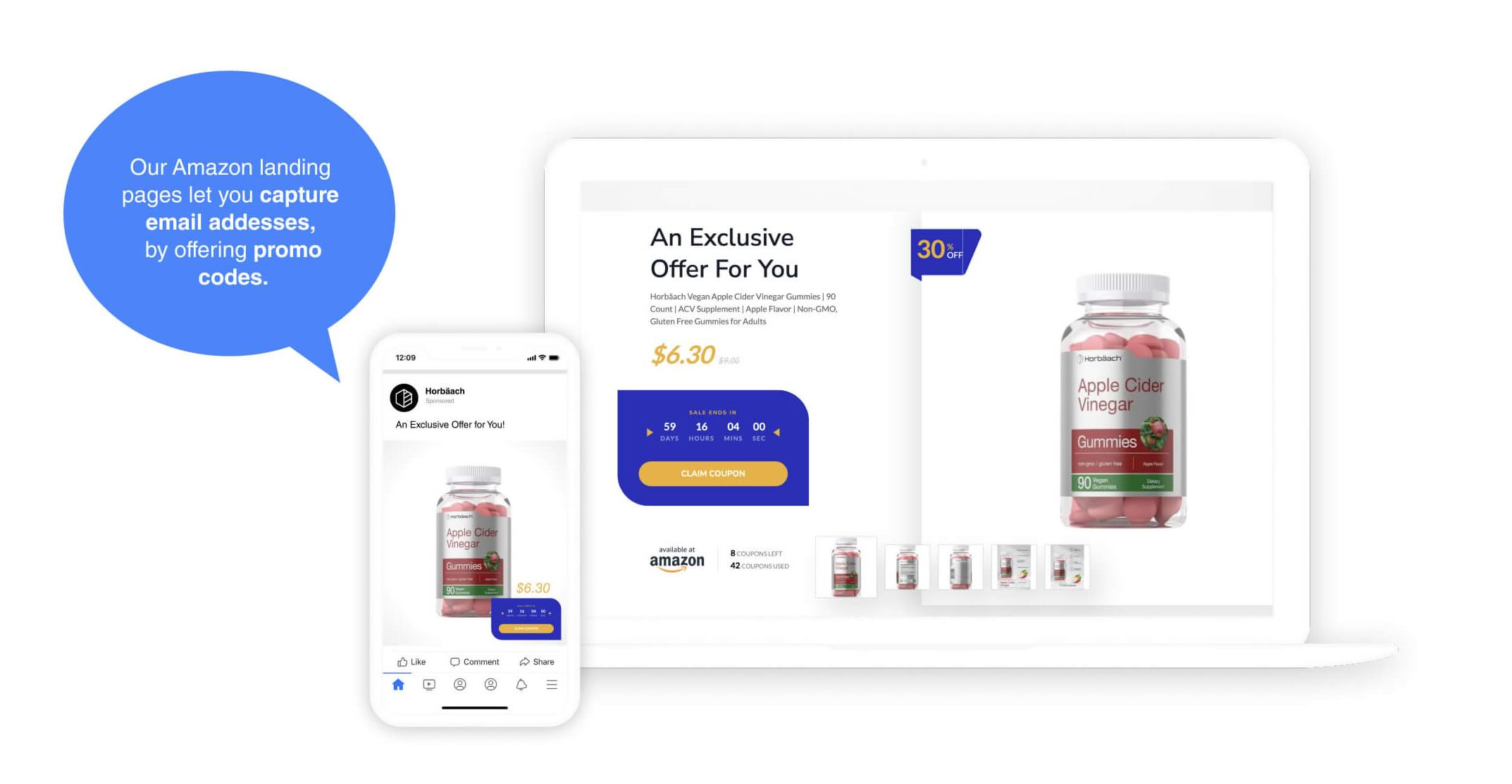
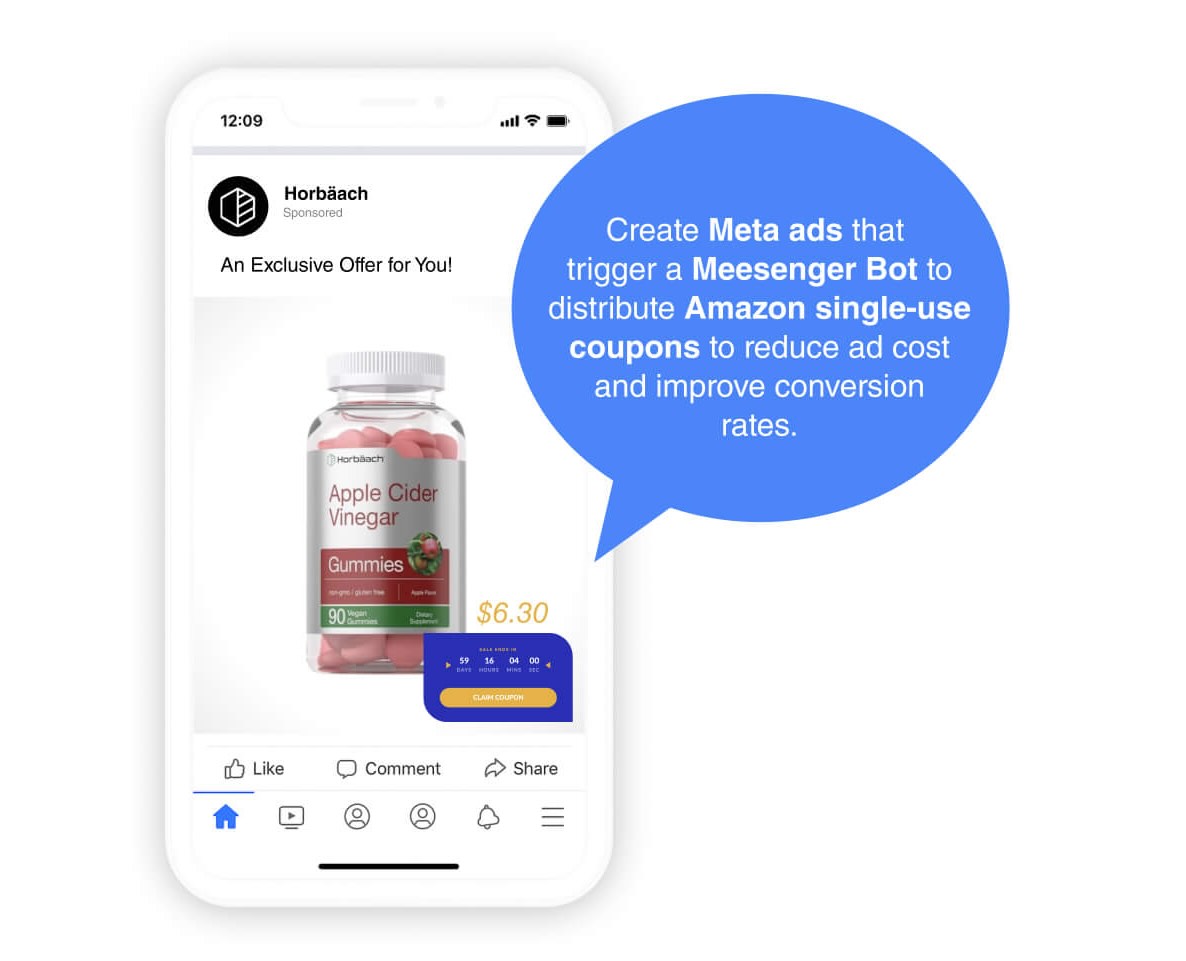
LandingCube is built for Amazon sellers who want to grow smarter. From Amazon landing pages that support your product promotions to promo code delivery and performance tracking tools, LandingCube gives you the infrastructure to build a real brand around your Amazon business. 

Start your free 21-day trial today.

Frequently Asked Questions

How much money do I need to start advertising on Amazon?

There is no minimum deposit required, but most new sellers in a moderately competitive US category should budget at least $30 to $50 per day for the first 30 days. This level of spend gives the algorithm enough click data to identify which keywords convert and which ones to cut.

How long does it take for a new Amazon ad campaign to become profitable?

The first two to four weeks function as a data collection phase where spending more than you earn is normal. Most campaigns reach consistent profitability in weeks five through eight, after negative keyword work and keyword migration to manual exact-match campaigns have reduced wasted spend.

Should I turn off my ads if I am losing money in the first week?

No, because Amazon’s attribution window can extend up to seven days, meaning a click from Monday may not register as a confirmed sale until later in the week. Shutting campaigns down in week one means you discard the data you already paid to collect.

What is a “good” ACoS on Amazon?

A good ACoS is any number at or below your product’s gross profit margin, because that is the point where your advertising is at least breaking even financially while still building organic rank. For well-optimized accounts in competitive categories, an ACoS between 15% and 25% is a common benchmark, but your individual margin is always the real target.

Why are my Amazon ads getting impressions but no clicks?

Low CTR almost always points to a weak main product image, a price above the competition on the same page, or a low review count compared to the products surrounding your ad. Improving any one of these three factors typically raises your click-through rate.

Why are my Amazon ads getting clicks but no sales?

Clicks without conversions mean your product detail page is not persuading shoppers to buy, which usually traces back to weak bullet points, missing A+ Content, unclear secondary images, or a price that feels too high once shoppers compare your listing to alternatives. Fix the listing before scaling your ad budget.

Can I run ads for a product that is fulfilled by a merchant (FBM) instead of FBA?

Yes, but your ads will only show when your FBM offer wins the Buy Box, which FBM listings lose to FBA alternatives frequently. Losing the Buy Box pauses your campaigns automatically, making FBM ad performance far less predictable than FBA.

Should I bid on my competitors’ brand names?

Bidding on competitor brand names can drive traffic, but conversion rates are typically low because those shoppers already have a specific brand in mind. It works best when your product offers a clear, obvious advantage in price, reviews, or a key feature that makes your ad worth clicking over the intended result.

How often should I optimize my Amazon PPC campaigns?

New campaigns need a check every 48 hours for the first two weeks to catch obvious irrelevant search terms early. After that, once or twice per week is the right cadence. Optimizing more frequently than that disrupts the algorithm’s learning and makes it hard to identify which specific change caused a performance shift.

Do Amazon ads help improve my organic ranking?

Yes, every sale your Amazon Sponsored Products campaigns generate for a given keyword signals to Amazon’s A9 algorithm that your product is relevant for that search term and lifts your organic position over time. This is why running ads at break-even ACoS is often a smart investment during a product’s launch phase, even before the campaigns themselves become profitable.

LandingCube Platform Demo

Enter your email below to get access to a full demo video of the LandingCube platform.

? ? ?

Questions? Contact support@landingcube.com to chat with our support experts
Download Your Free PDF
Almost there. Please complete this form to get your guide on "How To Drive Traffic To Your Amazon Listing".  
>">
We'll send you occasional emails. Unsubscribe anytime.

Learn Facebook Ads for Amazon

Subscribe to our free Facebook Ads for Amazon email course to learn everything you need to know to rank your products higher, build an audience, and make more sales.